Drop in the whole recording.
Leave with the clips.
Cutroom AI transcribes your video in this browser and scores every sentence. Drop in several takes and it keeps the best one of each line, with the reason. It cuts the pauses and ums, ranks vertical clips, and lays out versions to post side by side, with a long-form cut when the talk runs long. Your footage never uploads.
Free plan: 3 edits a month at 720p with a small watermark. No account.
- [ In your browser ]
- [ Speech on your GPU ]
- [ Export on your device ]
- [ Chrome, Edge, Safari ]
Checks on every export
- Length
- Audio sync
- Black frames
- Frozen frames at cuts
- Clipped words
- Frame size
It reads the whole recording at once.
Cutroom AI scores every sentence on its opening, substance, vocal energy and fillers. Plotted over time, those scores show where the strongest stretches are. Those become clips.
Attention
Time
 Here's the mistake almost everyone makes with pasta
0400:23 → 00:41  Why does your garlic taste bitter?
0100:59 → 01:19  Nobody tells you the pasta water is half the sauce
0201:33 → 01:51  If you cook for a family, buy canned tomatoes in winter
0302:00 → 02:17
The curve and clips come from Cutroom AI's own scoring of a two-and-a-half-minute practice talk by a home cook. It runs when this page loads.
Long recordings it reads
- Podcasts
- Livestreams
- Webinars
- Interviews
- Classes
- Talks
- Product demos
The screens, in motion.
Screen recordings of Cutroom AI working on the bundled sample project.
- cutroom / analyze[ Analyze ]
Each step shows its real count
- cutroom / clips[ Picks ]
Each ranked clip shows its reasons
- cutroom / clips[ Trim ]
Trim by one frame or one second
- cutroom / clips[ Mark your own ]
Press I and O while it plays
One long take. A stack of clips.
Stop scrubbing the timeline for the good parts. Cutroom AI lines them up. Export all renders every clip in a single batch.
Source
- Here's the mistake almost everyone makes with pasta
0400:23 → 00:41 - Why does your garlic taste bitter?
0100:59 → 01:19 - Nobody tells you the pasta water is half the sauce
0201:33 → 01:51 - If you cook for a family, buy canned tomatoes in winter
0302:00 → 02:17
From transcript to finished clip, in one editor.
From recording to post.
Step 01
Drop in the video
A podcast, livestream, class or interview, straight from your drive.
Step 02
Cutroom AI finds the clips
It transcribes the talk, scores it and ranks the strongest stretches.
Step 03
Export and post
Vertical MP4s with captions for TikTok, Reels and Shorts, and a long-form cut for YouTube when the talk runs long.
Built for long recordings.
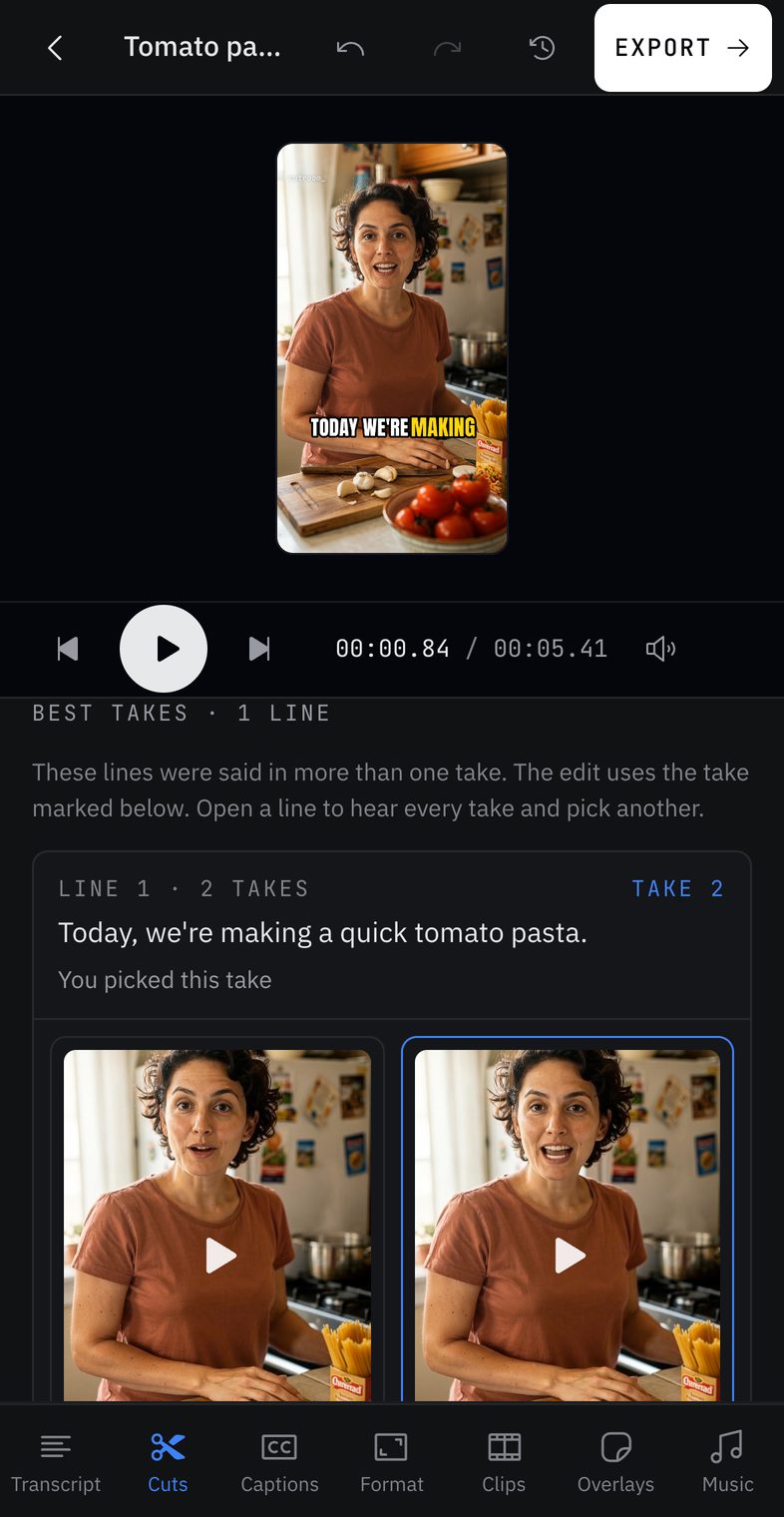
The best take of every line
Say a line as many times as you need, in one file or several. Cutroom AI matches the takes, scores each one and keeps the best. Tap another take to swap it in.
Versions to post, side by side
Natural, tight and hook-first cuts, plus 15 and 30 second clips, each with its own captions. A long talk also gets a long-form cut. Pick the ones you want and export them together.
Picks you can check
Each clip shows the four scores behind its rank, so you can see why it made the list.
Your computer does the work
Speech runs on your graphics card through WebGPU, or on the processor if there's no graphics card. Nothing waits in a queue.
Captions from the transcript
Word-timed captions in 8 styles. Edit them on the clip.
Frame-exact trims
Move either edge by one frame or one second, then play it back before you export.
Your footage never leaves this device.
Cutroom AI decodes, transcribes, scores and exports in this browser. A copy of each project's cut list and transcript text syncs under a random id so the project opens in your other browsers. Video and audio stay on this device.
If you ask a text model for titles or picks, only the transcript text goes through our server to OpenRouter. Cloud video features are off.
- [ No upload ]
- [ No analytics ]
- [ No sign-in ]
- Video engine
- Checking
- Speech model
- Checking
- Frame rate
- Checking
- Saved in this browser
- Checking
Read from this browser just now.
Start free. Pay when you need more edits.
An edit is one automatic cut of a new project. Changes inside the editor are free, and there is no unlimited tier.
Free
Free
3 edits a month
720p, small watermark
Starter
$59.99
per year
60 edits a month
No watermark
Pro
$129.99
per year
150 edits a month
No watermark
Questions
Does my footage upload?
No. Decoding and export run in your browser, so your files stay on your device.
How long can a recording be?
Any recording up to 180 minutes opens on every plan, and the clip finder reads all of it. A full cleaned edit can use 3 minutes of footage on Free, 30 on Starter and 60 on Pro. Clips cut from a longer recording export on any plan. Long files are read five minutes at a time to keep memory use flat.
How does it choose clips?
Cutroom AI splits the transcript into sentences and scores each one on its opening, substance, vocal energy and fillers. It ranks stretches of the length you choose, then keeps the best ones that don't overlap. Talk about the recording itself, like "can you hear me", never makes it into a clip.
Which browsers work?
Cutroom AI needs WebCodecs to read and export video. Use a current version of Chrome, Edge, Arc or Safari 26.
What counts as an edit?
One automatic cut of a new project. Changes you make inside the editor do not use up edits.
What does the free plan include?
3 edits a month at 720p with a small watermark. You do not need an account.
Can I undo a cut?
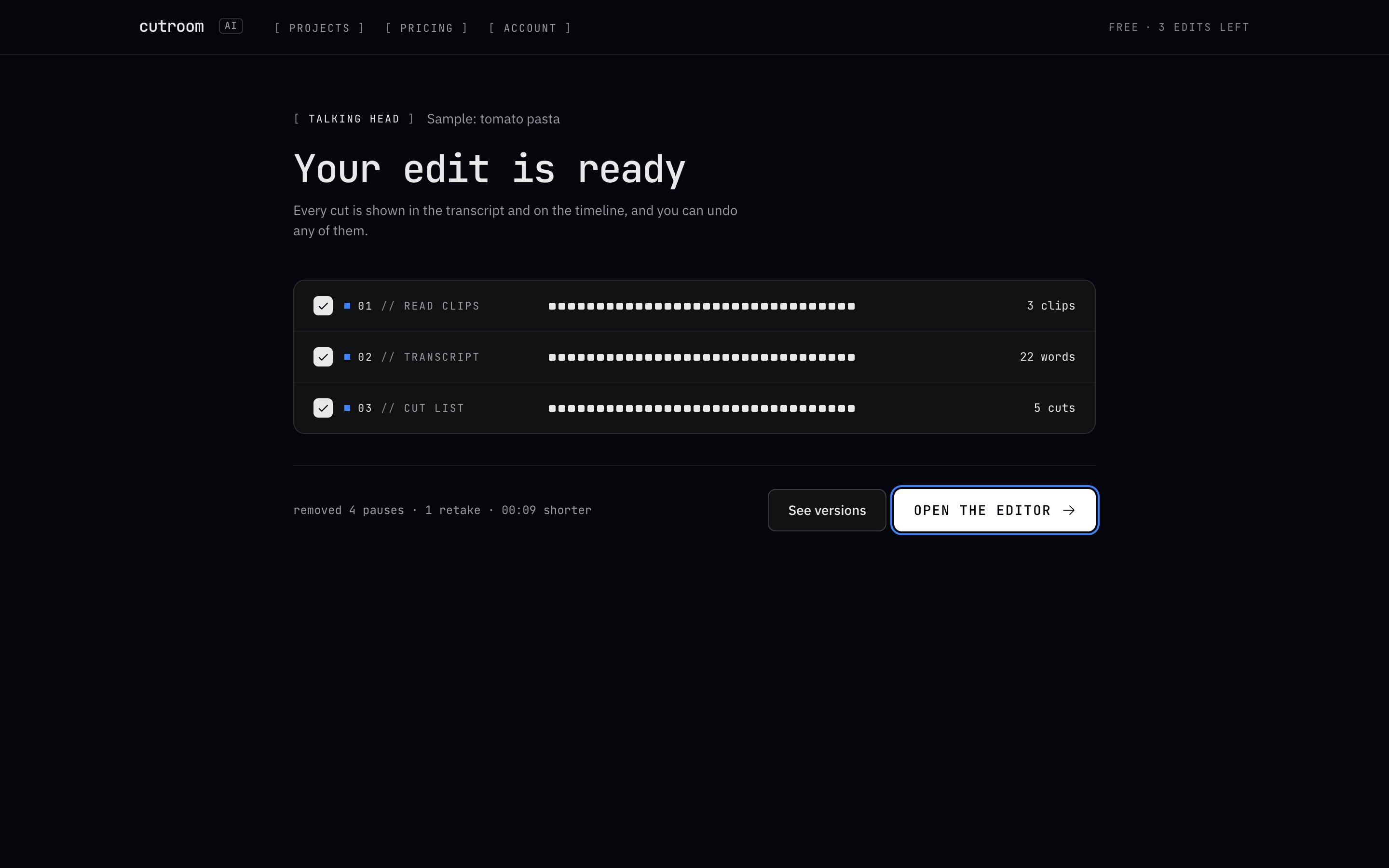
Yes. Every cut is shown in the transcript and on the timeline, and you can restore any of them.
Start free
Try it on the sample first.
The sample opens in seconds and doesn't use an edit. Then bring your own recording.
Free plan: 3 edits a month at 720p with a small watermark. No account.