Is there a Cutroom AI phone app?
Not yet. The phone app is in progress and has not been released, so it is not in any app store.
Updated November 12, 2026
Using the web editor on a phone
The web editor runs in a phone browser only if that browser supports WebCodecs, the feature Cutroom AI uses to read and write video on your device. Support differs by phone, browser and version, so we do not promise it.
The quickest check: open the Projects page on your phone. If it says “This browser can't edit video yet”, that browser cannot edit. The browsers answer page lists the ones that work.
What the app is for
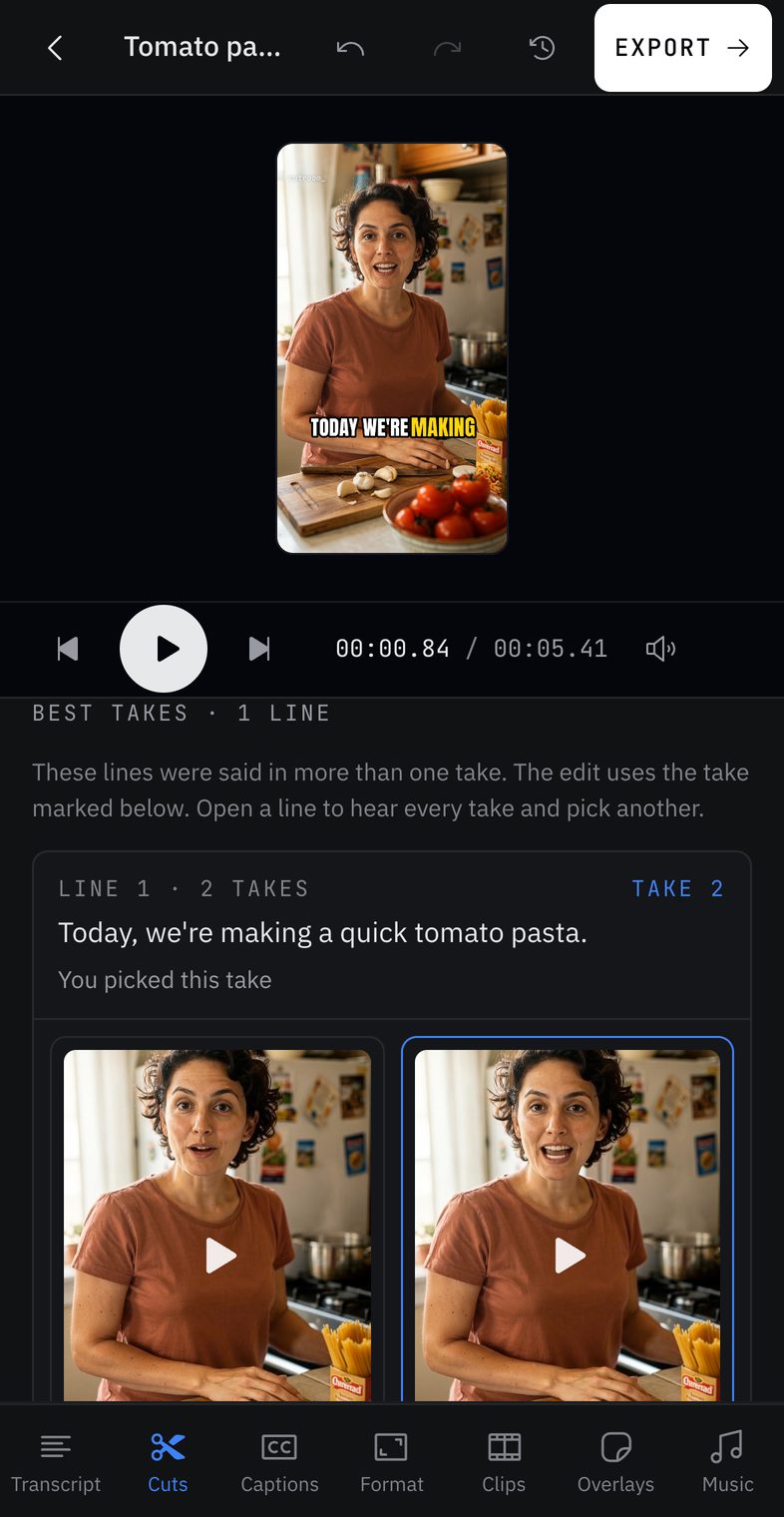
The screenshot above is from the app in progress: its Best takes screen, where every take of a line sits side by side. There is no release date yet, and we will not point you to an app store until it is really there.
What to do today
Film on your phone, move the files to a computer the way you usually do, such as AirDrop or a cable, and edit in Chrome, Edge, Arc or Safari 26. Cutroom AI imports MP4 and MOV files. If a clip uses a codec your browser cannot decode, the import tells you. Your video and audio never upload, so the files only travel as far as your own computer.
If you film with a script, the recorder at /record works in the same desktop browsers, with a script card that scrolls as you read. Takes recorded there are kept even if the tab reloads.
Keep reading
Try it on your own footage.
The editor opens in your browser with no account, and the sample project doesn't use an edit.