Cutroom AI vs CutAI
CutAI is an iPhone app that records your takes and edits them in its cloud. Cutroom AI is a browser editor that does similar work on your own device. The names are close, and the products are separate.
Updated November 12, 2026
| Cutroom AI | CutAI | |
|---|---|---|
| Platform | Browser: current Chrome, Edge, Arc or Safari 26. Phone app in progress | iPhone app |
| Account | None needed | Account first |
| Where edits are processed | On your device. Video and audio never upload | In its cloud, per its privacy page |
| Record with pauses between takes | Yes, at /record, with a scrolling script | Yes |
| Retakes, dead air and fumbles | Removed. Best take scored per line | Removed |
| Rambling | Off (a cloud feature) | Removed |
| Batch | Up to 10 videos, one edit each | Up to 10 videos |
| Overlap audio, recipes, 20 layers | Yes | Yes |
| Output shape | 9:16, 1:1, 4:5 and 16:9 | App Store reviewers ask for horizontal 16:9 |
| Teleprompter | Yes | App Store reviewers ask for one |
| Large files | No file-size cap | Up to 16 GB (release notes 1.1.2) |
| Price | Free plan. Starter $9.99 and Pro $19.99 a month | $19.99 to $89.99 |
Facts about other products come from their own public pages, read on the dates under Sources. Products change; check their pages before you decide.
What each one is built for
CutAI is made for the phone. You record in the app, pausing between takes, and it removes retakes, dead air and fumbles. Its listing and release notes add batches of up to 10 videos, overlap audio, recipes, up to 20 layers, text with fonts and animations, and zoom keyframes. You make an account first, and its privacy page describes the edit being processed in its cloud.
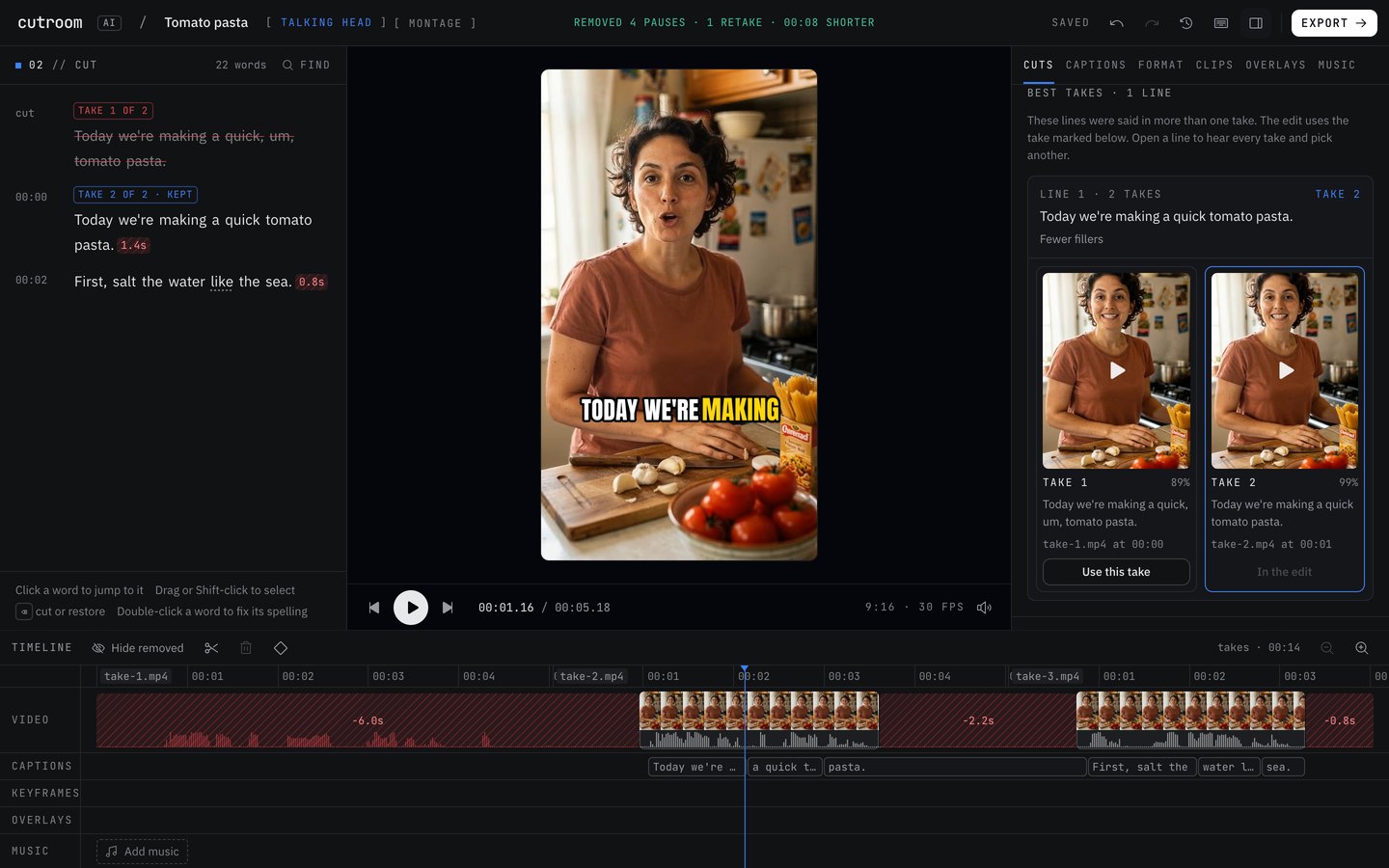
Cutroom AI is made for the browser. It records at /record or takes your files, cuts retakes, pauses and fillers on your device, and never uploads your video or audio. There's no account step. Its phone app is in progress and not released.
Row by row
Privacy and sign-up. CutAI asks for an account and processes edits in its cloud. Cutroom AI opens without one. Video and audio stay on your device, and only the cut list and transcript text sync, under a random id, so the project opens in your other browsers.
The cut. Both remove retakes and dead air. CutAI also removes rambling. In Cutroom AI that's a cloud text feature, and it's switched off. Where Cutroom AI adds something is the take pick: every take of a line is scored, the reason is shown, and you can swap it in the Best takes view.
Batches and polish. Here the two line up closely, with batches of up to 10, overlap audio, saved recipes, up to 20 layers, text animations and zoom keyframes on both. CutAI's release notes add keyframes on layers. Cutroom AI has keyframes for zoom only.
Shape and length. App Store reviewers ask CutAI for horizontal 16:9 output and for a teleprompter. Cutroom AI exports 9:16, 1:1, 4:5 and 16:9 and has a teleprompter. CutAI's release notes mention files up to 16 GB. Cutroom AI sets no file-size cap. Length is what counts: up to 180 minutes on any plan.
Where CutAI is the better pick
- You film and edit entirely on an iPhone. Cutroom AI's phone app isn't out.
- You want rambling cut automatically.
- You want keyframes on overlay layers as well as on zoom.
- You want each raw recording backed up to Photos.
Where Cutroom AI is the better pick
- You edit on a computer and want no install and no account.
- Your footage must stay on your device.
- You need 16:9, 1:1 or 4:5 output.
- You want the best take of each line chosen and explained, plus several finished versions.
- You need clips from a long recording, multicam, or a beat-synced montage.
How to try both
Record one short script three times on your phone and run it through CutAI there. Then copy the same files to your computer, open Cutroom AI's editor and drop them in. Compare the picks line by line, and try a 16:9 export of the Cutroom AI version.
CutAI lists plans from $19.99 to $89.99. Cutroom AI's free plan needs no account, and the sample project shows a finished edit without using one of your edits.
Sources
- CutAI website, read November 11, 2026
- CutAI privacy page, read November 11, 2026
- CutAI on the App Store: listing, release notes and reviews, read November 12, 2026
Keep reading
Try it on your own footage.
The editor opens in your browser with no account, and the sample project doesn't use an edit.