Cut a pile of clips to the beat of your song
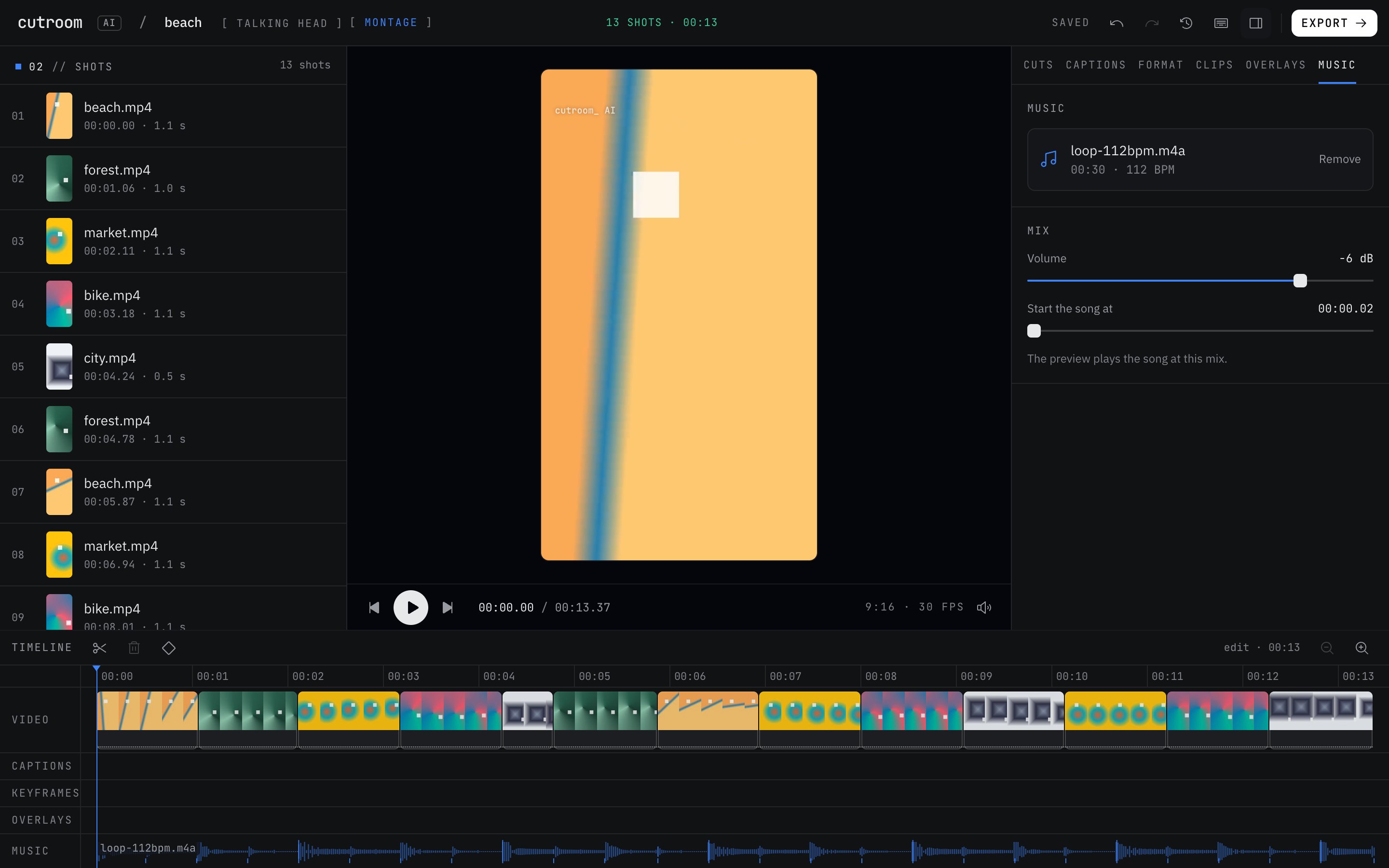
Montage mode is for footage without talking: a trip, a listing, an event, a product. Give it five to fifty clips and a song, and it picks the best moment of each clip and lands the cuts on the beat.
Updated November 12, 2026
How clips are chosen
Every clip is scored on sharpness, motion, exposure and shake. A blurry pan, a dark corner or a shot where your hand wobbled scores low, and the best moment of each clip is what makes the cut.
Near-duplicates are dropped, so ten seconds of the same sunset from three angles becomes one shot, not three. That matters most on trips and events, where you tend to film the same thing over and over.
Order has two settings. "As filmed" keeps the clips in the order you shot them, which suits a day that tells its own story, from coffee to the last sunset. "Build up" starts calm, rises to a peak in the last third and ends on a calm shot, which suits a product reveal or a listing tour that saves the view for the end.
How the beat sync works
Add a song and Cutroom AI finds its beat and tempo and shows the BPM. With "Cut on the beat" on, cuts land on beats, and the beat ticks on the timeline show where. Set a target length under "Aim for" and the edit ends on the nearest 4 or 8 bar line, so it doesn't stop mid-phrase.
No song yet? The cuts follow a steady 120 BPM. Add a song later in the Music tab and the montage re-cuts to its beat.
How to make a montage
- 01Open the editor and choose Montage as the kind of edit.
- 02Drop in five to fifty video clips and, if you have one, the song.
- 03Set the length and leave "Cut on the beat" on.
- 04Play it. Swap the song in the Music tab and the cut follows the new beat.
- 05Pick a format, 9:16 for Reels or 16:9 for YouTube, and export at 30 or 60 fps.
What to film for a better montage
- Hold each shot for a few seconds. The best moment needs a clip long enough to have one.
- Move slowly. Fast pans blur, and blur scores low.
- Shoot in good light. Exposure is part of the score, and a dim clip loses to a bright one.
- Film at 60 fps for sports or dancing, then export at 60 to keep the motion smooth.
What it won't do
It has no music library. Use a song you have the rights to post.
Photos can't go into a montage. It's cut from video clips. Photos belong over a talking-head edit as b-roll.
It doesn't generate footage or fill gaps with stock clips. If you filmed eight seconds of usable video, you get a short montage.
Montage mode doesn't edit speech. If someone talks in a clip, it's treated as footage, and the ums stay.
When another approach is better
If the video is someone talking, use Talking head. You can still drop silent clips in as b-roll, and a song added in the Music tab ducks under the voice.
If you want a precise edit where shot four must land on the chorus, a montage gets you a fast first cut, but placing every shot by hand is still a job for a timeline editor.
Questions
Do I need a song?
No. Without one, the cuts follow a steady 120 BPM. Add a song whenever you like.
How many clips can I use?
Five to fifty video clips per montage.
Can I use photos?
Not in a montage. Photos go over a talking-head edit instead.
Does it include music?
No. There's no stock music. Bring your own song.
Keep reading
Try it on your own footage.
The editor opens in your browser with no account, and the sample project doesn't use an edit.