A CapCut alternative for talking videos
CapCut gives you a blank timeline and a big media library. If most of what you edit is you talking to a phone, Cutroom AI hands you a finished cut instead. Here's what that trade costs you.
Updated November 12, 2026
Who switches, and why
The person searching for a CapCut alternative is often not an editor by trade. It's a realtor filming a walk-through, a teacher recording a lesson, a shop owner explaining a product. They open CapCut, drag the clip in, and spend the next hour slicing out pauses and "um"s by hand. When that hour is the reason a video never gets posted, an automatic first cut matters more than a bigger effects library.
Others want to keep their footage off cloud storage, or want beat-synced montages in a browser, which CapCut's help page only offers in its mobile and desktop apps.
Where Cutroom AI does the job
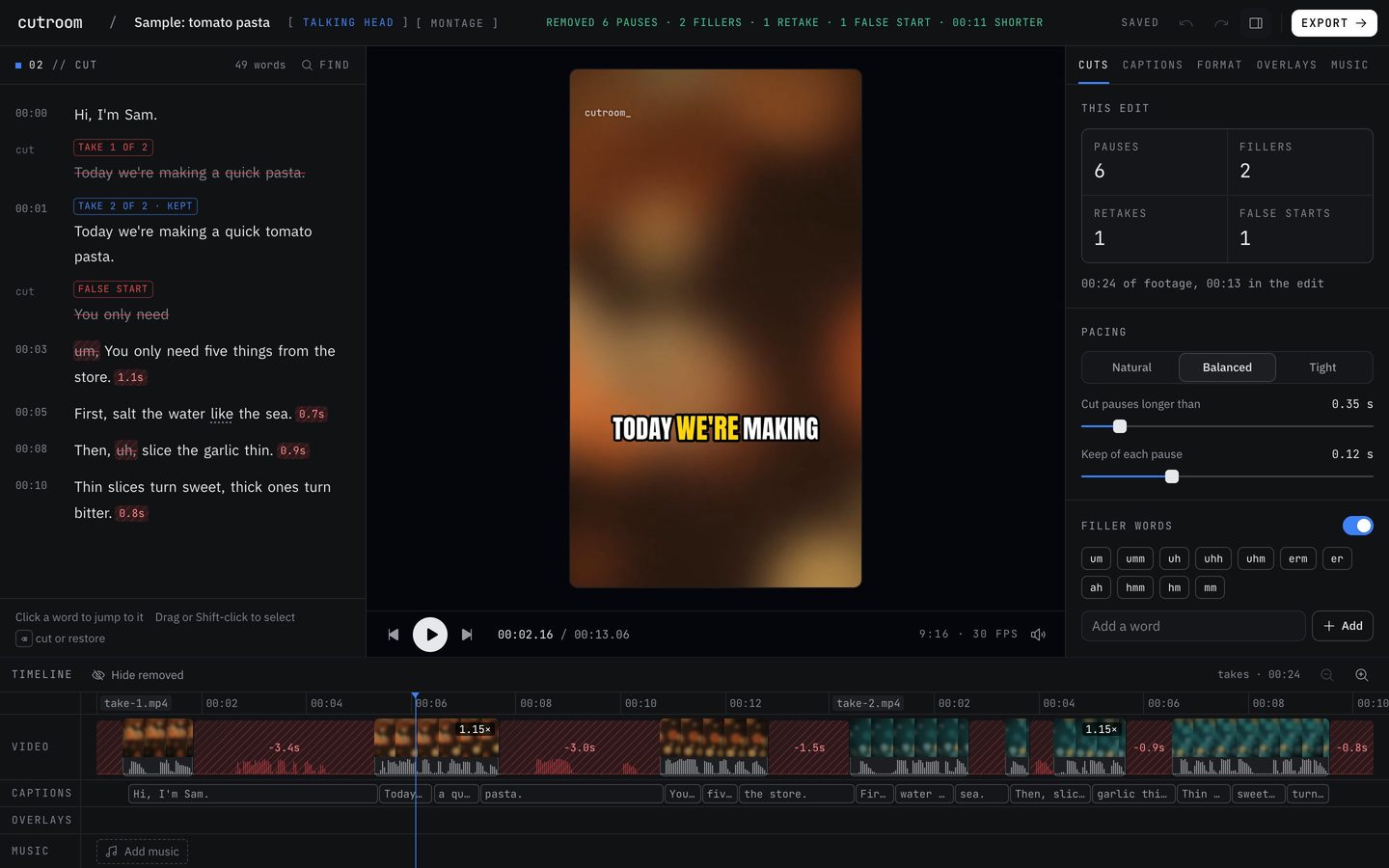
- The first cut is automatic. Pauses are tightened to one of three presets and hard fillers come out. Retakes and false starts go too.
- Each cut edge is walked to where the sound starts and ends, snapped to the quietest moment and faded, so words don't get clipped.
- Captions come word-timed from the transcript, one to three words at a time, with the spoken word highlighted.
- Face-tracked reframe to 9:16, 1:1, 4:5 or 16:9, with auto punch-ins on jump cuts.
- Your own music, ducked under speech, and up to 20 overlay layers for text, photos, video and sound.
- Montage: a pile of clips placed on the beats of your song, in the browser.
Where it falls short of CapCut
If your videos lean on effects, stock tracks or a teammate's edits, keep CapCut for those and use Cutroom AI for the talking ones.
- No stock music, sound effects or footage. You bring your own.
- No team workspace or cloud collaboration.
- No AI script or chat editing; the cloud text features are off.
- Fewer caption styles than tools that sell style libraries: 8 styles and 7 templates.
- No import from cloud drives or a YouTube link. Files come from your computer.
- No phone app yet. It's in progress.
Switching over
Try it on one video you'd normally edit this week.
- 01Find the raw clips you'd usually drag onto CapCut's timeline. MP4, MOV, WebM and MKV all open, with no file-size cap.
- 02Open the editor. Any current Chrome, Edge or Arc works, and so does Safari 26. No account.
- 03Drop the clips in. If they're takes of the same script, they're matched line by line.
- 04Pick a pacing preset. Balanced is the default; tight cuts gaps over 0.3 seconds down to 0.08.
- 05Choose a caption style, then a destination preset such as TikTok or Reels.
- 06Add your music file. It sits lower under speech without you setting anything.
- 07Export the MP4. Each export is checked for audio sync, black frames, frozen frames at cuts and clipped words.
Questions
Is there stock music?
No. Use your own song or record a voiceover in the editor. Music is lowered under speech automatically.
Can I still fine-tune the cut?
Yes. Click any struck-through word to restore it, switch the pacing preset, crop or pan by hand, add zoom keyframes, and undo or redo any step.
Can it cut to the beat in a browser?
Yes. Montage mode reads the beats of the song you add, places your clips on them and leaves out near-duplicates.
Is it free?
There's a free plan with 3 edits a month at 720p and a small watermark. An edit is one automatic cut of a new project; changes inside the editor don't count.
Does my footage go to a server?
No. Transcribing, cutting and exporting all happen in your browser, so the video and audio never upload.
Sources
- CapCut online video editor page, read November 11, 2026
- CapCut help: how to use Auto Cut, read November 11, 2026
Keep reading
Try it on your own footage.
The editor opens in your browser with no account, and the sample project doesn't use an edit.