Cutroom AI vs Submagic
Submagic is built around captions and short clips, with AI hook titles, free b-rolls and scheduling. Cutroom AI is built around cleaning up your takes on your own device, with captions and a clip finder along the way.
Updated November 12, 2026
| Cutroom AI | Submagic | |
|---|---|---|
| Caption languages | 16 spoken languages | 118 languages |
| Caption styles | 8 styles and 7 templates | Subtitle library. 30 custom brand templates |
| Clips from a long video | Clip finder from a file, four scores per clip | Magic Clips from a file or YouTube URL, with a virality score |
| Hook text | Optional hook line from the clip's own words | AI hook titles |
| B-roll | Your own photos and clips only | Free b-rolls |
| Bad takes | Retakes found. Best take scored and kept | "Bad takes" removal |
| Zooms | Auto punch-in on jump cuts. Zoom keyframes | Auto zooms |
| Top resolution | Up to 2160p (4K) on Pro | 4K |
| Publish and schedule | No | Yes |
| Where it runs | Your browser. Video and audio never upload | Upload to its service |
| Price | Free plan. Starter $9.99 and Pro $19.99 a month | Plans from $12 to $41 |
Facts about other products come from their own public pages, read on the dates under Sources. Products change; check their pages before you decide.
What each one is built for
Submagic leads with captions: 118 languages, a subtitle library and brand templates. Its Magic Clips takes a file or a YouTube URL and returns key moments with a virality score. It also writes hook titles, adds free b-rolls and auto zooms, removes bad takes, edits by text, exports 4K, and publishes and schedules posts.
Cutroom AI leads with the edit itself. It cuts pauses, fillers and retakes, picks the best take of each line, then captions, reframes and exports. The clip finder works on recordings up to 180 minutes. The whole job happens in your browser, with no upload of the video or audio.
Side by side
Captions. Submagic covers 118 languages and can translate. Cutroom AI transcribes 16 and doesn't translate, since its cloud text features are off. It has fewer styles too. What it gives you is control over the words: edit any caption, drag it into place, start a new line after a comma, export SRT.
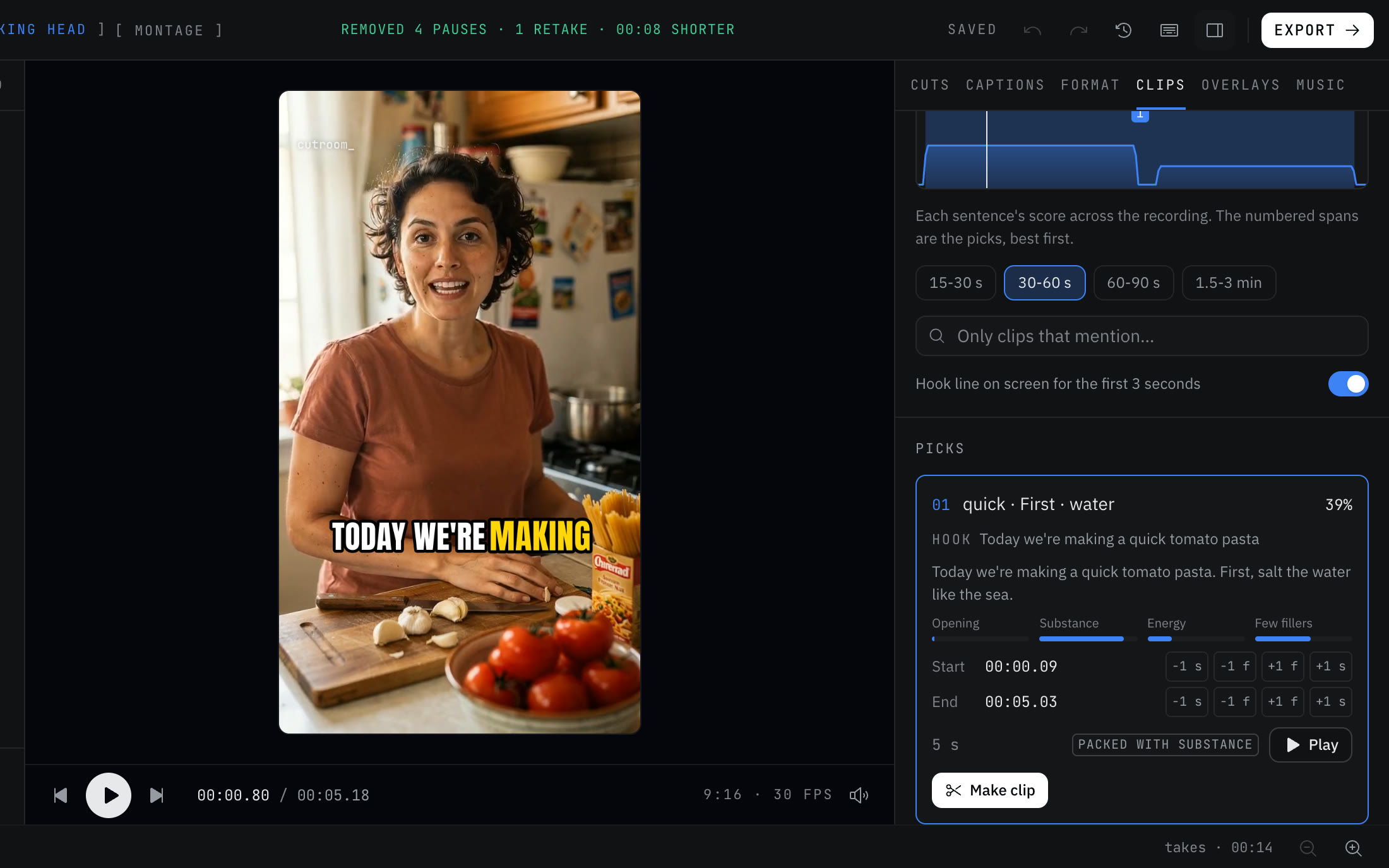
Clips. Submagic accepts a YouTube URL. Cutroom AI only takes a file you have. Submagic gives a virality score, while Cutroom AI shows four scores per clip and an attention curve over the whole recording, so you can see the strong stretches before you pick.
Hooks. Submagic writes AI hook titles. Cutroom AI's optional hook line is lifted from the clip itself, so the words on screen are words you said.
B-roll and publishing. Submagic adds free b-rolls and can publish and schedule. Cutroom AI places only your own photos and clips, by file name or speech, and you post the MP4 yourself.
Where Submagic is the better pick
- You caption in a language Cutroom AI doesn't cover, or need translations.
- You want clips straight from a YouTube URL.
- You want AI-written hooks and b-roll added for you.
- You publish and schedule from the same tool.
- A team shares brand templates.
Where Cutroom AI is the better pick
- Your raw footage has retakes, and you want the best one per line kept with a reason.
- The recording is private, or covered by an agreement that rules out uploads.
- You want to cut clips by hand with I and O, join ranges, and nudge edges by a frame.
- You want several versions of one talk to compare.
- You'd like to start without an account.
How to try both
Pick a 20 minute talk you have as a file. In Cutroom AI, open the editor, drop it in and open the Clips tab. Write down the top three picks and their scores. Run the same file through Submagic's Magic Clips and compare the moments each chose.
Then check the captions on a name or a piece of jargon each tool might mishear. In Cutroom AI, fix it once in the transcript and it stays fixed in new edits.
Sources
- Submagic home page, read November 11, 2026
- Submagic pricing, read November 11, 2026
- Submagic Magic Clips page, read November 12, 2026
Keep reading
Try it on your own footage.
The editor opens in your browser with no account, and the sample project doesn't use an edit.