Cutroom AI vs Opus Clip
Both tools turn a long recording into short clips. Opus Clip does it as an online service with prompts, a scheduler and an API. Cutroom AI does it in your browser, and your video and audio never upload.
Updated November 12, 2026
| Cutroom AI | Opus Clip | |
|---|---|---|
| Where the work happens | In your browser, on your device | Online service. You upload the video |
| How clips are found | Every sentence scored for hook, density, vocal energy and clean speech. Topic word search | ClipAnything prompts for scenes, actions and emotions. ClipBasic works from words said in the video |
| Score on each clip | Four part scores plus an attention curve over the recording | A virality score per scene |
| Clip length | Length presets. Clips start and end on sentence edges | Clips up to 15 minutes |
| Aspect ratios | 9:16, 1:1, 4:5 and 16:9, crop follows the face | ReframeAnything: 9:16, 1:1 and 16:9 |
| Several ranges in one clip | Mark with the I and O keys, then join | Compile a highlight reel across the video |
| Retakes and best take | Retakes found, every take scored, best one kept | Not on its pages |
| Other edits of one clip | Several finished versions from one analysis, each its own project | Duplicate a clip as an independent copy |
| Scheduler and API | No | Yes |
| Team workspace | No | Yes |
| XML export to other editors | No | On paid plans |
| Price | Free plan with 3 edits a month. Starter $9.99 and Pro $19.99 a month | Free plan with a watermark. Paid plans at $15 and $29 a month |
Facts about other products come from their own public pages, read on the dates under Sources. Products change; check their pages before you decide.
What each one is built for
Opus Clip is built around one job: you hand it a long video and it hands back short clips for social feeds. Its pages lead with ClipAnything, which takes a written prompt for the scenes, actions or emotions you want, plus a hands-free mode that picks prompts by genre. Around that sit templates, a scheduler, an API and a team workspace.
Cutroom AI is an editor first. It cleans up a talking recording, picks the best take of each line when you filmed several, and has a clip finder for long recordings. It's all done in a browser tab on your own machine, so the footage never uploads.
The differences, row by row
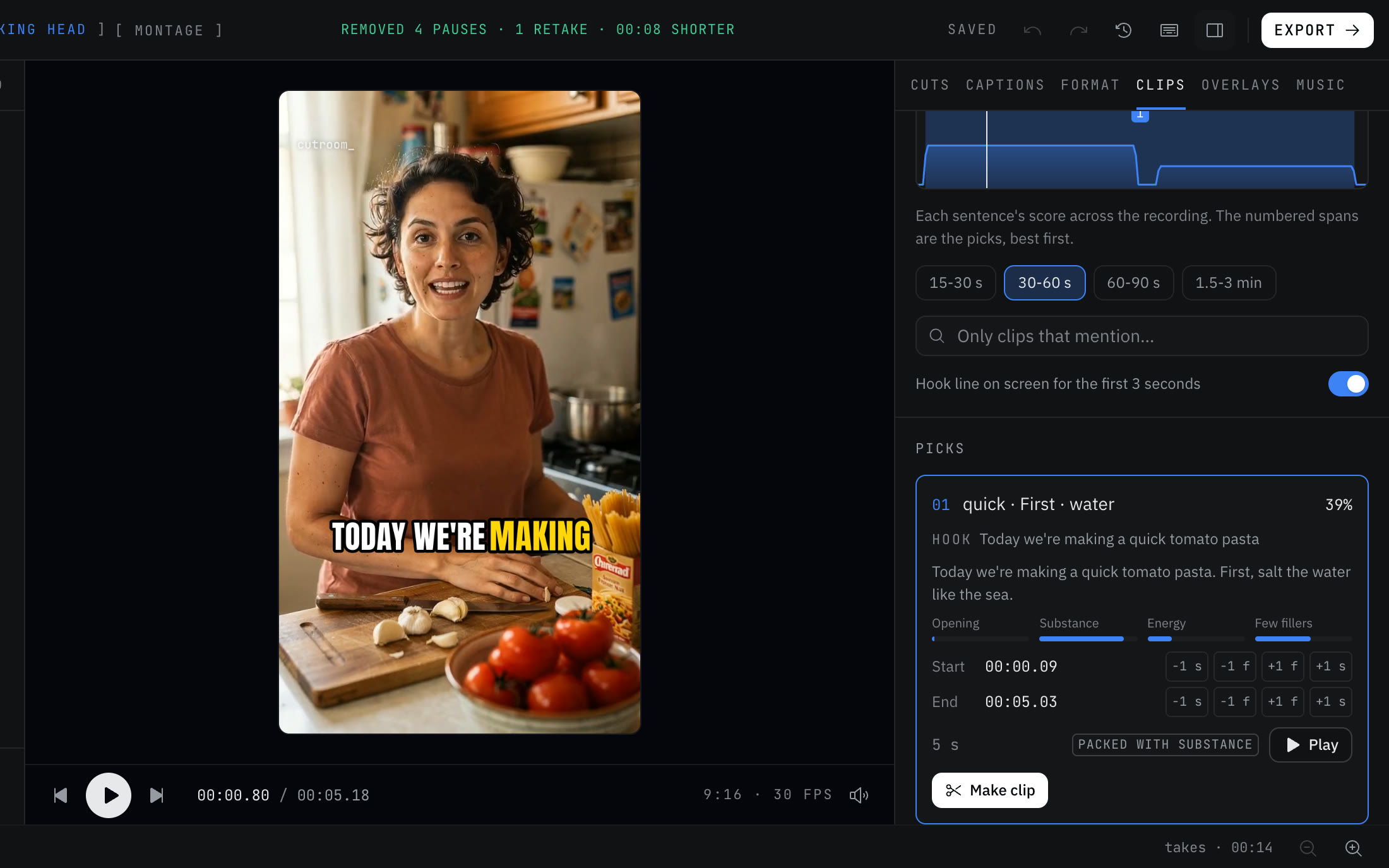
Finding clips. Opus Clip lets you describe what you want in plain words, and its ClipBasic mode works from words said in the video. Cutroom AI has no prompt box, because its cloud text features are switched off. Instead it scores each sentence on how it opens, how much it says, vocal energy and filler count. You get an attention curve over the whole recording with the picks numbered, and a topic search that finds a word anywhere in the transcript.
Scores. Opus Clip rates each scene for virality. Cutroom AI shows its four part scores on every clip card, so you can see why a clip ranked where it did. Neither number predicts views.
Length and shape. Opus Clip makes clips up to 15 minutes and reframes to 9:16, 1:1 or 16:9. Cutroom AI has length presets, ends every clip on a sentence edge, adds 4:5 for LinkedIn, and lets you nudge each edge by one frame or one second. Any plan opens a recording of up to 180 minutes, and clips from it export on Free.
Takes. Here the tools split. Opus Clip starts from a finished long video. Cutroom AI also works on raw footage: it groups retakes, scores every take of a line, and keeps the winner with a reason you can read, like "Fewer fillers".
Publishing. Opus Clip has a scheduler, an API, a team workspace and XML export on paid plans. Cutroom AI has none of those. You download MP4 files and post them yourself.
Where Opus Clip is the better pick
- You want to describe a scene or an emotion in words and have the tool find it. Cutroom AI only searches for words that were said.
- You post on a schedule from one place, or a script of yours calls an API.
- Several people share one workspace.
- You finish in Premiere Pro, DaVinci Resolve or Final Cut and need an XML timeline.
Where Cutroom AI is the better pick
- The recording must stay on your computer: a client call, a board meeting, an unreleased product demo.
- You filmed several takes of each line and want the best one picked for you, with the reason shown.
- You want the full recording cleaned up as well as clipped: pauses tightened, hard fillers removed, retakes cut.
- You want 4:5 for LinkedIn, or a tight cut, a hook-first cut and 30 and 15 second clips to compare side by side.
- You want to start without an account. Open the editor and drop a file in.
How to try both
Use one recording you know well, with a few moments you'd clip yourself. In Cutroom AI, open the editor, drop the file in, and open the Clips tab once the transcript is ready. Compare its numbered picks with your own list, then mark one range by hand with I and O. Opus Clip has a free plan with a watermark, so run the same file there and write a prompt for one of your moments.
If you'd like to see a finished Cutroom AI project before using an edit, try the sample. It opens a complete edit and doesn't count against your plan.
Sources
- Opus Clip home page, read November 11, 2026
- Opus Clip pricing, read November 11, 2026
- Opus Clip ClipAnything page, read November 12, 2026
- Opus Clip help: duplicate clips, read November 12, 2026
Keep reading
Try it on your own footage.
The editor opens in your browser with no account, and the sample project doesn't use an edit.