How to turn a long video into Shorts
A good Short is one complete thought that makes sense with no setup. Find those moments, trim each one to open on its strongest line, then reframe, caption and export.
Updated November 12, 2026
What makes a moment work as a Short
It opens with a line that gives someone a reason to stay: a claim, a question, a surprise. It has something in it, like a tip, a mistake to avoid or a story with an ending. It stands alone, so there's no "as I said earlier". And it ends on a landing, not halfway through a sentence.
Length follows the thought. A single tip can live in 15 to 30 seconds. A story with a turn might need a minute or more. Cutting a story down to fit a length usually kills it.
Film the long video with clips in mind
- Say the point first, then explain it. A front-loaded answer gives you a clean place to start a clip.
- Name the thing instead of pointing back to it. "The mistake people make with sourdough starter is..." works as a clip. "So that thing I mentioned..." doesn't.
- Frame a little wide and stay near the middle of the shot, so a vertical crop has room around your head.
- Pause between topics. The pause is where a clip begins or ends.
- Go easy on "as you can see here" during your best points. A vertical crop may not show what you're pointing at.
The manual way
- 01Watch the whole video and note the timecode of every strong moment.
- 02Copy each moment into its own 9:16 sequence.
- 03Trim the start to the first line that stands alone, and the end to a full stop.
- 04Reframe: keyframe the crop so it follows the speaker as they move.
- 05Add captions.
- 06Export each clip.
Why it takes a full afternoon
You can't skip the first watch. Good moments hide in the middle of slow stretches, and you only spot them by listening. Then finding the right first line for each clip is trial and error: start here, too slow, start two sentences later, now it needs the setup.
The Cutroom AI way
- 01Drop the recording in on the Projects page. Recordings up to 180 minutes open on every plan, and the clip finder reads all of it.
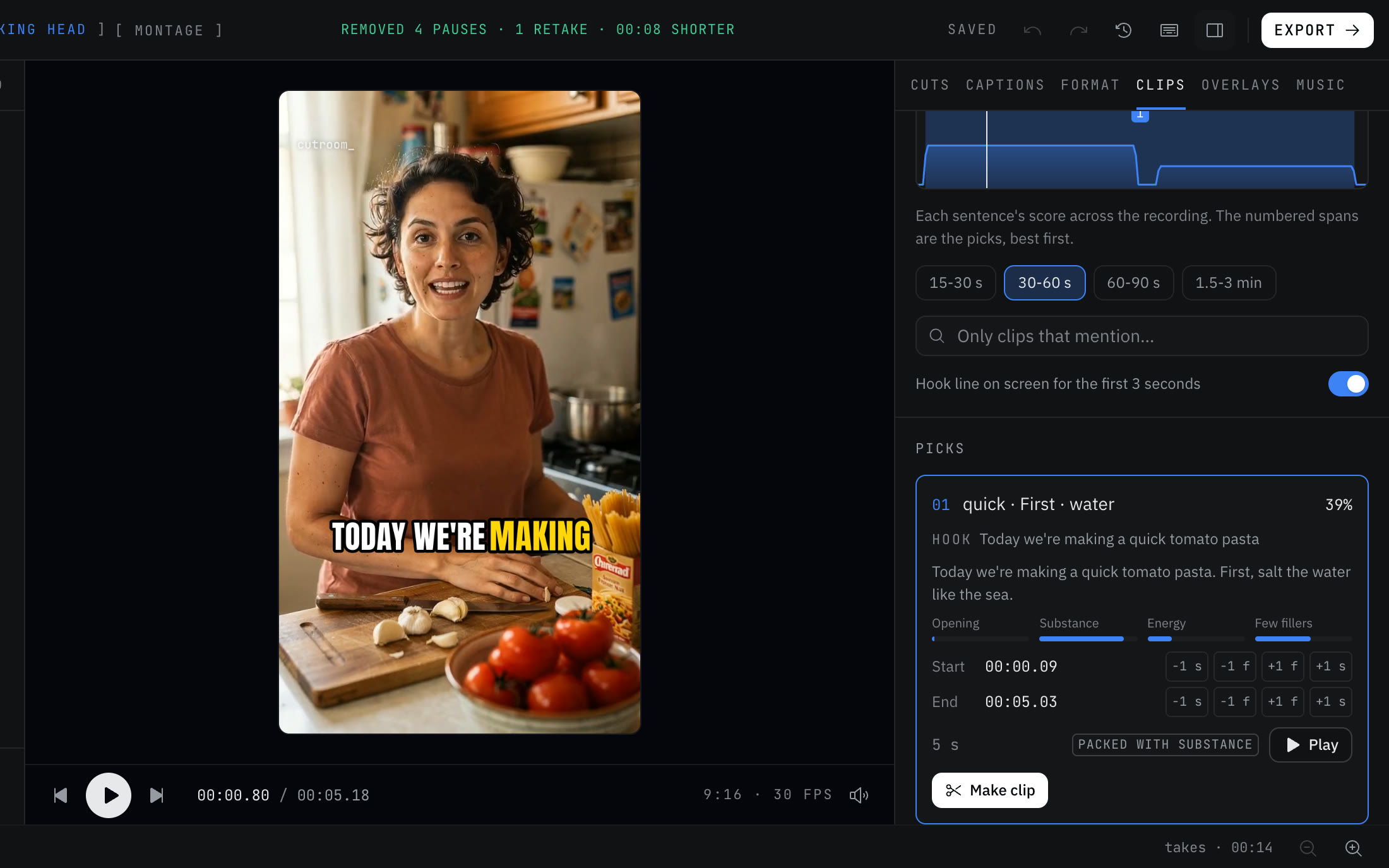
- 02Open the Clips tab. The attention curve shows every sentence's score across the whole recording, with the picks numbered, best first.
- 03Choose a clip length: 15-30 s, 30-60 s, 60-90 s or 1.5-3 min.
- 04To find a topic, type a word into “Only clips that mention”.
- 05Open a pick and read “Why it scored”. Each clip gets four scores: Opening, Substance, Energy, Few fillers.
- 06Nudge the start or end by one frame or one second with the -1 f, +1 f, -1 s and +1 s buttons.
- 07Turn on “Hook line on screen for the first 3 seconds” if you want the clip's own opening words up top.
- 08Click “Make clip”. Each clip opens as its own vertical project, and the original stays as it was. “Export all” renders the lot.
Marking your own clips
The picks are a starting point. Under “Mark your own”, press I at the start and O at the end while the video plays. Click “Add another range” to join a second moment, such as a question from minute four and its answer from minute nine, into one clip.
Clips start and end on sentence edges, keep their captions and follow the face. Talk about the recording itself, like "can you hear me?", never becomes a clip. Clips cut from a long recording export on any plan, even when a full cleaned edit of that recording would go past your plan's footage limit.
Mistakes to avoid
- Clips that need the setup. If you have to explain what came before, it's not a Short.
- Opening on "So," or "And". Trim to the first word that carries meaning.
- Burying the hook. If the best line is ten seconds in, start there.
- Captions over your face or down where the app's buttons sit. Drag them to the upper middle.
- Treating the scores as a forecast. They rank sentences against the rest of this recording. They don't predict views.
Questions
How long can the source video be?
Recordings up to 180 minutes open on every plan, and the clip finder reads the whole thing.
Can I make one clip from two separate moments?
Yes. Mark one range, click “Add another range”, mark the second, then make the clip.
Does it write titles or captions for posting?
No. AI-written hooks and titles are turned off. The optional hook line uses words from the clip itself.
Does it work on a horizontal recording?
Yes. Each clip opens as a vertical project, and the crop follows the face.
Keep reading
Try it on your own footage.
The editor opens in your browser with no account, and the sample project doesn't use an edit.