How to turn a podcast into clips
Pick exchanges that make sense on their own, start each clip on the line that hooks, crop to whoever carries the moment, and caption it. Filmed episodes give you the most to work with.
Updated November 12, 2026
What makes a podcast clip work
A podcast moment usually needs two halves inside the clip: a question and its answer, or a claim and the pushback. Without the first half, the second has nothing to push against.
The moments that travel tend to be a disagreement, a story with a turn in it, or one specific, usable piece of advice from the guest. Long host preambles rarely make the cut. If the guest's answer restates the question, the clip can start on the answer.
Film the episode with clips in mind
- Give each person their own mic. Clean sound per voice makes every later step easier.
- If you can, put one camera on each person and keep a wide shot that holds both.
- Frame loosely. A vertical crop needs room around each face.
- Ask guests to answer in full sentences that restate the question. "The worst hire I ever made was..." clips well. "Oh, that one, yeah" does not.
- Keep every camera rolling for the whole episode. Stopping and restarting makes syncing harder in any editor.
The manual way
- 01Listen to the whole episode, or skim a transcript, and note the timecode of every strong exchange.
- 02Pull each moment into its own vertical sequence.
- 03For each line, choose the camera on whoever is talking and crop to them.
- 04Trim, caption and add the guest's name on screen.
- 05Export each clip.
Why it eats a day
Episodes are long, and the first full listen is unavoidable by hand. Then each clip needs its own crop and its own caption pass, and podcast clips often need two moments stitched together, which means hunting for both.
The Cutroom AI way
- 01Drop the episode in on the Projects page. Recordings up to 180 minutes open on every plan.
- 02The transcript labels two voices as Speaker 1 and Speaker 2, which makes exchanges easy to scan.
- 03Open the Clips tab. The attention curve shows the strongest stretches, and the picks are ranked with their four scores.
- 04Type a topic into “Only clips that mention” to find every pick about, say, pricing or hiring.
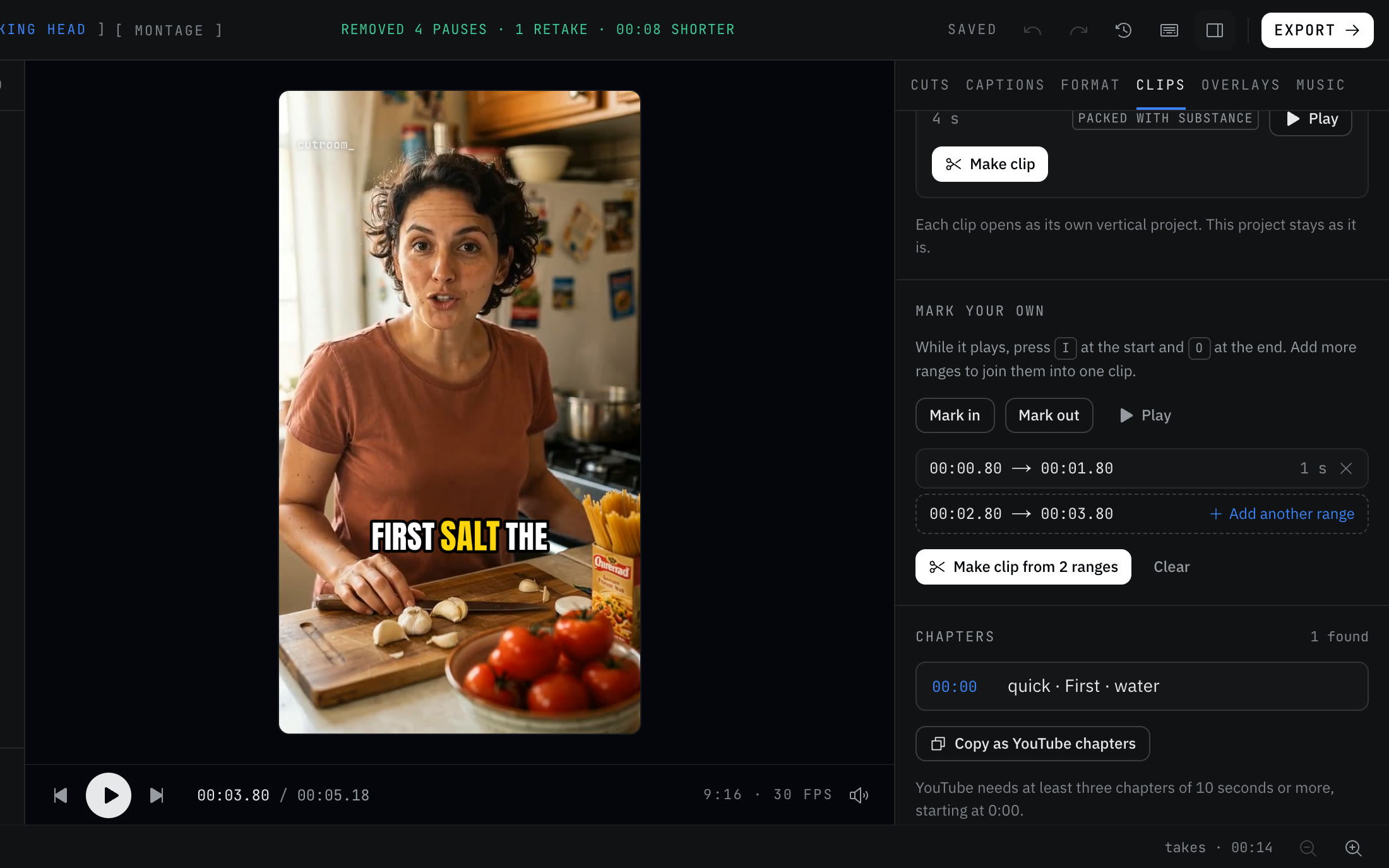
- 05To join a question to its answer, use “Mark your own”: press I and O around the question, click “Add another range”, mark the answer, then click “Make clip from 2 ranges”.
- 06Each clip opens as its own vertical project with captions, and the crop follows the face.
- 07Add the guest's name with “Add text” in the Overlays tab, then use “Export all” in the Clips tab.
Make the sound match across clips
Podcast clips often come from different parts of the episode, where levels drift as people lean in and out. Every export is evened to -14 LUFS, so clips from minute five and minute fifty play at the same loudness. “Remove background noise” takes out hiss, hum and room noise.
If you add your own music, it ducks under speech so the voices stay on top. Keep it quiet. A podcast clip is about the conversation.
What it can't do yet
With two cameras, Cutroom AI switches angles at jump cuts and at sentence starts. It does not yet pick the camera of whoever is speaking in a two-person interview. If one person carries the moment you want, make that clip from their camera's file, or use a wide shot that holds both people.
It also cannot post or schedule clips to your accounts. You download the MP4s and post them yourself.
Mistakes to avoid
- Starting on a long question. Trim the host down to the last sentence of it, or start on the answer.
- Cropping to one person while the other is mid-reply. The viewer hears a voice with no face.
- Leaving in crosstalk. Two people talking at once is hard to follow on a phone.
- Forgetting the guest's name. New viewers don't know who they're watching.
- Adding a song you do not have the rights to post.
Questions
How long should a podcast clip be?
Long enough to hold the question and the answer. The clip length presets run from 15-30 s up to 1.5-3 min. An exchange between two people usually needs more room than a single tip.
Can it tell the two speakers apart?
Yes. The transcript labels two voices as Speaker 1 and Speaker 2.
Will it cut to whoever is talking?
Not yet. With a second camera it switches at jump cuts and sentence starts, not by who is speaking.
Can I join two moments into one clip?
Yes. Mark one range, add another, and make the clip from both.
Can it post the clips for me?
No. There is no posting or scheduling. Export the clips and upload them yourself.
Keep reading
Try it on your own footage.
The editor opens in your browser with no account, and the sample project doesn't use an edit.