How to pick the best take
Judge one line at a time, play its takes back to back against the same short checklist, and keep the one a viewer would believe. Don't keep the last take out of habit.
Updated November 12, 2026
What makes one take better than another
Run every take of a line past the same questions. Most of them have a clear answer.
- Did the words come out clean, with no um, no restart, no repeated word?
- Is there a long pause in the middle of the line?
- Is the pace easy to follow? Somewhere between two and four words a second is comfortable for most speech.
- Is the sound at a good level, and free of distortion when you got loud?
- Are you in frame, near the center and in focus?
- Did you sound like you meant it? This one only you can judge.
Film takes that are easy to compare
- Say the line the same way each time, starting with the same words. Takes that start the same are easy to line up.
- Leave a beat of silence between takes so each one has clean edges.
- Stop the recording between run-throughs so each take is its own file. Scoring runs when takes sit in two or more files; inside one long recording, a repeated line keeps its later complete take instead.
- Don't move the camera between takes. If the framing matches, you can swap any take into the edit without a visible jump.
- Don't delete takes on set. A take you hated in the moment can be the cleanest one for a single line.
The manual way
- 01Put every take on the timeline.
- 02Drop a marker at the start of each line in each take, or keep a list of timecodes.
- 03For one line, play each take back to back.
- 04Score them against the checklist above. Write the scores down, because you will forget.
- 05Keep the winner and cut the rest.
- 06Move to the next line and repeat.
- 07Play the whole thing through and listen for jumps in tone or level where two takes meet.
Why it wears you out
Five takes of a twenty-line script is a hundred clips to hear. By the third take of a line you tend to remember the last one best, so the comparison drifts toward whatever you heard most recently.
And you do it all again if you change the script order or reshoot one line.
The Cutroom AI way
- 01Record at /record with the script card, or drop all your take files in on the Projects page.
- 02Takes of the same script in two or more files are matched line by line, in script order. If a line lands out of order, fix it in the Line order panel.
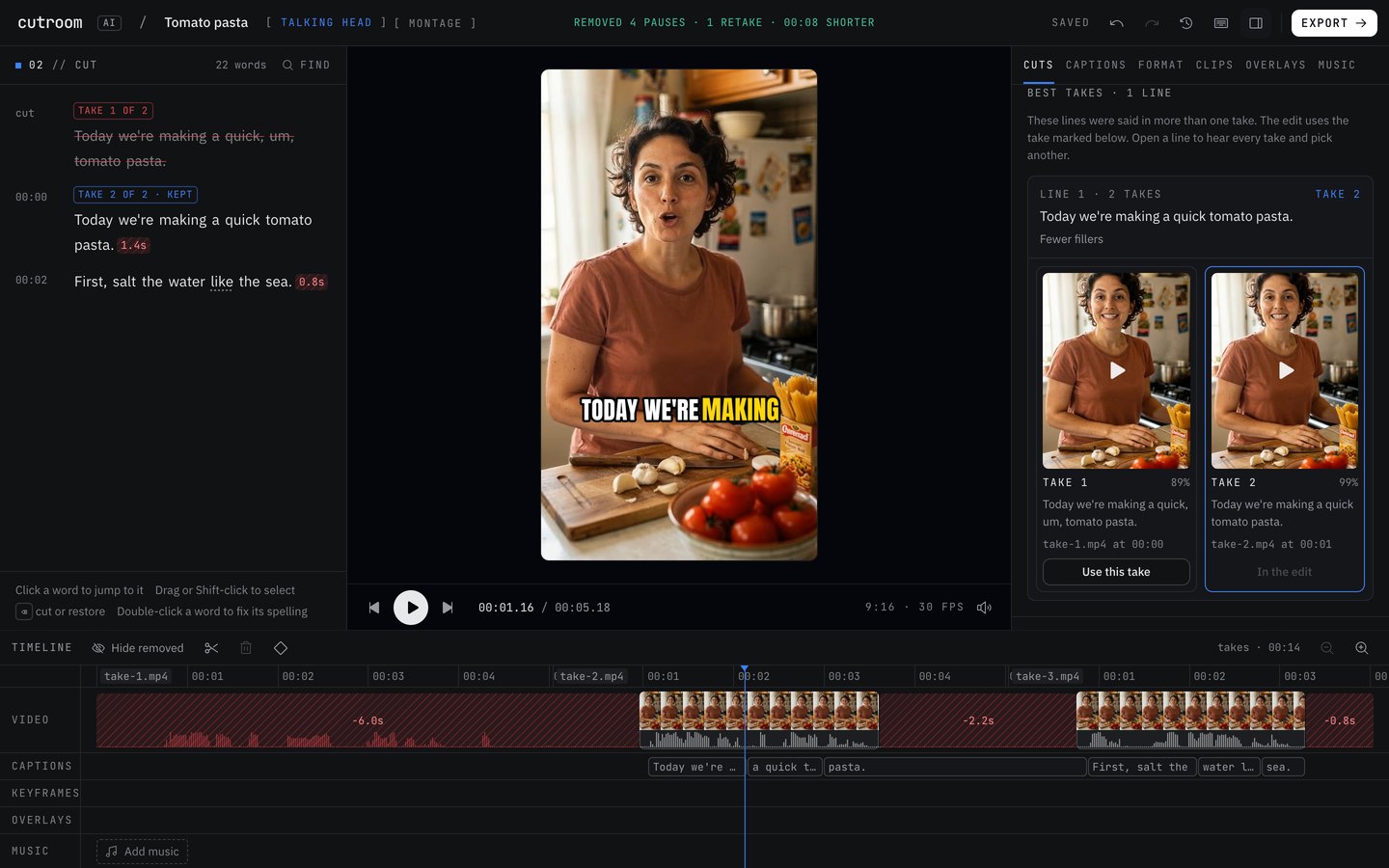
- 03Open the Cuts tab and click “Best takes”. It lists every line that was said in more than one take.
- 04Open a line. Every take sits side by side with its own player and score, and the one in the edit is marked “In the edit”.
- 05Read the reason under the pick: “Fewer fillers”, “No long pause mid-line”, “Steadier pace”, “Clearest words”, “Better sound level”, “Face in frame” or “Sharper picture”.
- 06Play the others. If you prefer one, click “Use this take”. It then shows “You picked this take”.
What the score measures
Each take is scored on fillers, restarts, the longest pause inside it, pace, word confidence, sound level and clipping, whether your face is in frame and centered, and sharpness. When two takes tie, the later one wins and the reason says so: “As good as the others, and the latest”.
A take that never finishes the line, or runs under 75% of the line's longest take, is marked “Cut off”. It only wins if every take is broken, and then the reason reads “Every take is cut off; this one is the best of them”.
Mistakes to avoid
- Picking from memory a day later. Compare takes side by side, in one sitting.
- Judging on picture alone. A great look with a muddy word still loses.
- Mixing takes with different framing inside one section. Swaps should look like the same shot.
- Over-rehearsing until it goes flat. Take nine can be the cleanest and the most lifeless. Listen to the top two yourself.
Questions
How many takes should I film?
For most lines, two or three is plenty. Film more of the lines that carry the video, like the opening and the main point, and fewer of the connecting lines in between.
Can it pick takes spread over several files?
Yes. Takes are matched line by line across separate files, in script order.
What happens when two takes are equally good?
The later take wins, and the pick says so.
Does it judge my facial expression?
No. It checks that your face is in frame and centered, and that the picture is sharp. Expression and delivery are left to you.
Can I override the pick?
Yes. Open the line in “Best takes” and click “Use this take” on any take.
Keep reading
Try it on your own footage.
The editor opens in your browser with no account, and the sample project doesn't use an edit.