Keep the best take of every line, across separate files
Read the same script three or four times, then drop every take in at once. Cutroom AI lines the takes up sentence by sentence, scores each one and builds the edit from the winners, with a short reason next to every pick.
Updated November 12, 2026
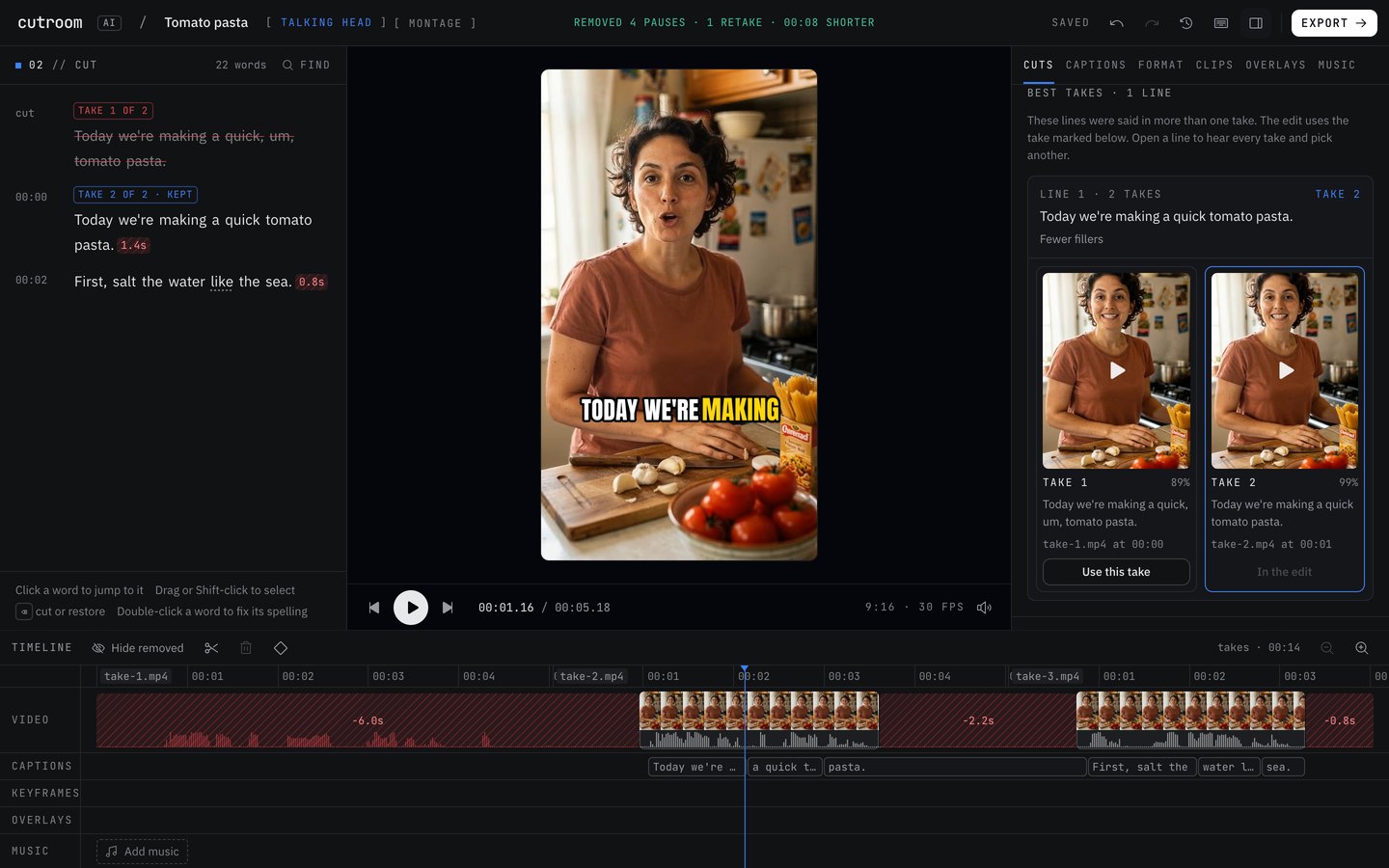
What the best take picker does
Say you film a 60-second cooking video in four takes. Take 1 has a clean intro, but you lose your place at the garlic step. Take 3 nails the garlic step and fumbles the ending. Take 4 has the best ending. By hand, that means scrubbing four files and cutting between them sentence by sentence.
Cutroom AI treats every sentence of the script as a line and every time you said it as a take of that line. It matches the takes by their words, in script order, even when they sit in separate files. The finished edit plays line by line, each line from the take that scored best, and the rest of the cleanup still runs on top: pauses shortened, ums cut, captions timed to the words that made it in.
What each take is scored on
Every take of a line gets a score from things that can be measured in the file. None of them is a guess about taste.
- Fillers: how many ums and uhs sit inside the line.
- Restarts: stumbles and repeated words.
- The longest pause inside the line.
- Pace: 2 to 4 words a second reads as natural. Faster sounds rushed, slower drags.
- Word confidence: how sure the speech model is about each word. It drops when you mumble.
- Sound level and clipping: too quiet, or so loud the audio distorts.
- Face in frame and centered.
- Sharpness of the picture.
Ties, cut-off takes and the reason label
Each pick carries its reason in plain words, such as "Fewer fillers", "No long pause mid-line", "Steadier pace" or "Sharper picture". When two takes score almost the same, the later one wins and the label says so: "As good as the others, and the latest". People redo a line until it sounds right, so the last good attempt is usually the one they meant.
A take that never finishes the line, or runs under 75% of the length of that line's longest take, counts as cut off. It only wins when every take of the line is cut off, and the label then tells you it was the best of a broken set.
How to use it
You need two or more takes of roughly the same script. Stopping the camera between takes, so each take is its own file, gives the picker the most to work with.
- 01Open the editor from the Projects page and choose Talking head as the kind of edit.
- 02Drop in every take at once, plus any photos you want placed over the lines. Pick the spoken language if it isn't English.
- 03Wait for the analysis. The speech model runs on your device, so the first run is slower while the model loads.
- 04Open the Cuts tab. The Best takes panel lists every line that was said more than once, with the take in the edit marked.
- 05Open a line to see its takes side by side, each with its own player and score. Press "Use this take" to swap one in.
- 06If lines from separate files play in the wrong order, open Line order and move a line up or down.
- 07Export when it sounds right. Swapping takes inside the editor doesn't use another edit.
What it won't do
It picks whole lines. It won't splice the first half of a sentence from take 2 onto the second half from take 4. If no take of a line is good, record that line again and add the new file.
It matches lines by their words, with some tolerance. If you improvise and every take says something different, there is little to match. Keep the wording close between takes.
It can't hear that a joke landed better in take 2. The score covers what can be measured. Timing and feeling are yours to judge, which is why every take stays one click away.
There's no eye-contact correction. If you read off a screen beside the lens, that shows in every take.
When another approach is better
If you filmed one continuous recording and repeated a line right after you flubbed it, you don't need separate files. Retake removal handles repeats inside one file and keeps the later complete take. The full scoring with reasons is for takes spread over two or more files.
If you speak off the cuff and only one take is usable, skip takes altogether and let the pause and filler cleanup tidy that one file.
Questions
Do my takes have to be separate files?
No, but it works best that way. With two or more files, every line is matched across them and scored. In one continuous recording, a line you repeat within about a minute and a half counts as a retake, and the later complete one stays.
Can I overrule the pick?
Yes. In the Cuts tab, open the line under Best takes, play the takes and press "Use this take". The label changes to "You picked this take". Undo works as well.
Does picking a different take cost an edit?
No. An edit is the first automatic cut of a new project. Changes inside the editor, swapping takes included, are free.
Keep reading
Try it on your own footage.
The editor opens in your browser with no account, and the sample project doesn't use an edit.