Cut retakes and false starts out of one continuous recording
Leave the camera rolling, flub a line, say it again. Cutroom AI finds the lines you said twice, keeps the later complete one and strikes the half sentences you abandoned.
Updated November 12, 2026
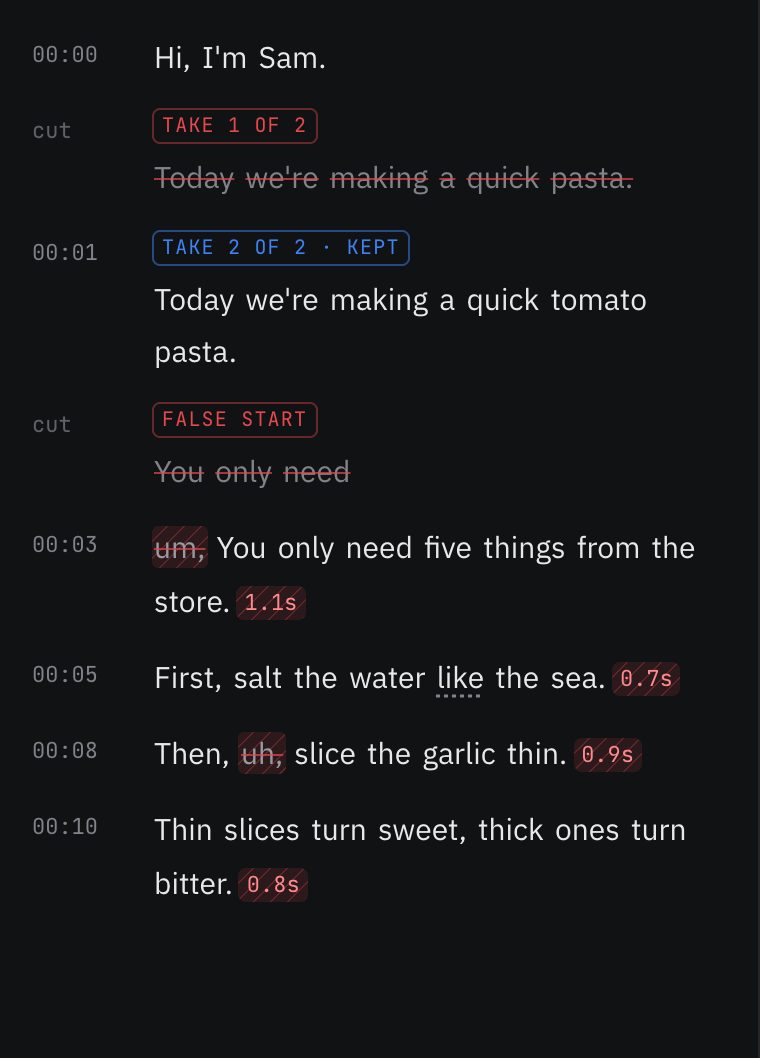
How retakes are found
Most people film themselves the same way: hit record, talk, mess up, pause, start the sentence over, keep going. The result is one long file full of repeats. Cutroom AI splits the transcript into sentences and compares them with a fuzzy match, so "Today we're making a quick pasta" and "Today we're making a quick tomato pasta" count as two takes of one line even though the words differ.
Repeats that fall within about a minute and a half of each other are grouped. The transcript labels them: "Take 1 of 2" struck through, "Take 2 of 2 · Kept" left in the edit.
Which take stays
Inside one recording, the later complete take stays. That matches how people work: you repeat a line because the earlier attempt was wrong. A take that stops short, under 75% of the length of the longest attempt, doesn't count as complete, so a line you abandoned halfway won't beat the full one you said before it.
If the takes live in separate files instead, the best take picker takes over and scores each take on fillers, pauses, pace, sound and framing. That has its own page.
False starts
A false start is shorter than a retake: "You only need" and then, a second later, "You only need five things from the store." Cutroom AI treats a short sentence as a false start when the next sentence starts within a few seconds and opens with the same two or more words. The fragment is struck through and labeled "False start".
False starts are checked before retakes, so a fragment gets the right label instead of being counted as a take.
How to use it
- 01Film the way you normally do. No clapping, no marking. When you flub a line, pause for a beat and say the whole sentence again from its start.
- 02Open the editor, choose Talking head and import the file.
- 03In the Cuts tab, "Remove retakes" and "Remove false starts" are on. The counts at the top show how many of each were cut.
- 04Read down the transcript. Each struck line carries its label. Click a struck line's words to bring them back if the cut was wrong.
- 05Turn either switch off if you'd rather handle repeats yourself. Undo covers every change.
What it won't do
It won't match a line you reworded completely. "Grab five things from the store" and "The shopping list is short" mean the same to you but share no words, so both stay. Restart with the same opening words and the match is easy.
It won't group repeats that are far apart in one file. Circle back to a line five minutes later and both versions stay in. Strike the one you don't want in the transcript.
It can't tell a deliberate repeat from a mistake. Say "Don't skip this step" twice on purpose and one copy gets cut. Click it back.
It won't cut a tangent that isn't a repeat. That's a judgment call, and the text model features that might make it are switched off.
When another approach is better
Reading a script start to finish several times? Stop the camera between read-throughs, or use the browser recorder, which saves each take separately. Then every line is matched across files and scored, which beats "later wins" when your last read-through wasn't your best.
If you never repeat lines and just talk loosely, retake removal has little to do. The clip finder suits that recording better: it ranks the strongest stretches across the whole file.
Questions
Do I need to clap or say "cut" between retakes?
No. Retakes are found from the words alone. Saying "cut" only adds a word you then have to delete.
I said a line three times. Which one stays?
The last complete one. The first two are struck through and labeled as takes of the same line.
Can I keep the earlier take instead?
Yes. Click the struck words of the take you want to restore them, then strike the later one. If you record takes as separate files, you can pick any take with "Use this take".
Does it work on long recordings?
Yes. Any recording up to 180 minutes opens. How much of it one cleaned edit can export depends on your plan: 3 minutes of footage on Free, 30 on Starter, 60 on Pro.
Keep reading
Try it on your own footage.
The editor opens in your browser with no account, and the sample project doesn't use an edit.