How to cut retakes from a video
A retake is any line you said more than once. Cutting them means finding every repeat, choosing one version and removing the others without leaving a bump in the sound.
Updated November 12, 2026
What counts as a retake
There are two kinds. A full retake is when you say the whole sentence, don't like it and say it again. A false start is when you get three words in, stop and start over.
Say you're filming a cooking demo. You say "Add the garlic now." It comes out flat, so you say "Add the garlic now, before the oil starts to smoke." The viewer should only hear the second one. If both stay in, the video sounds like a rehearsal.
Film so the retakes are easy to find
Most of the work of cutting retakes is finding them. A few habits on camera make that much quicker, whether you cut by hand or with software.
- Restart from the beginning of the sentence, not from the word where you slipped. A clean full sentence is easy to swap in. A half sentence glued to a fragment is not.
- Leave a beat of silence before you restart. That gap is where the cut goes, and it keeps the end of the bad attempt from bleeding into the good one.
- Keep the opening words the same each time. If attempt one starts "Add the garlic" and attempt two starts "Now it's time for garlic", nobody can tell at a glance that they're the same line.
- Keep the camera rolling between attempts. One long file is easier to work with than twenty short ones.
- Save your favorite version for last. When two attempts score the same, Cutroom AI keeps the later one.
The manual way, in any editor
This works in Premiere, Resolve, Final Cut, CapCut or anything with a timeline and a razor tool.
- 01Play the recording from the start and write down the timecode of every repeated line.
- 02Or scan the waveform: a retake usually looks like a block of speech, a short gap, then a block of almost the same shape.
- 03For each repeat, listen to every attempt and decide which one to keep.
- 04Razor at the start of the attempt you are dropping and again at the start of the one you are keeping.
- 05Ripple delete the dropped attempt so the gap closes.
- 06Play across the cut. If you hear a clipped breath or a click, move the edit point a frame or two.
- 07Repeat for every retake in the file.
Why the manual way is slow
You have to watch the footage at least once at normal speed, because you can't judge an attempt without hearing it. Then you listen again at every cut. On a ten-minute recording with a slip every few lines, that turns into an evening.
It's also easy to miss one. A repeat you skipped past at minute six shows up in the final video, and you find it on the third watch.
The Cutroom AI way
- 01Open the editor at /projects and drop the recording on “Drop your clips here”, or click “Choose files”. Several files of the same script work too.
- 02The analyze screen reads the clips, writes the transcript and builds the cut list on your device. Your video and audio never upload.
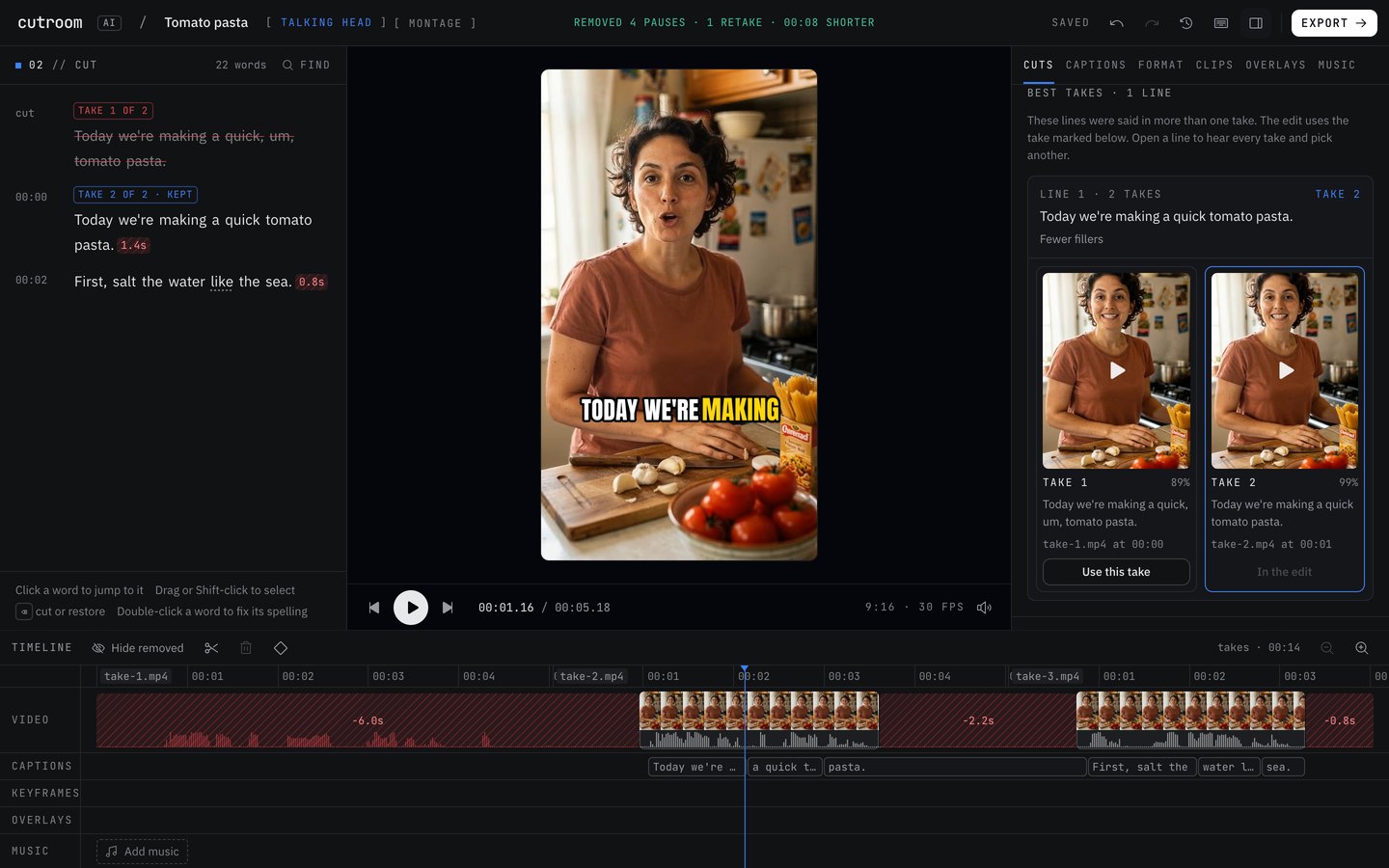
- 03Click “Open the editor”. Each repeated line shows its attempts in the transcript, marked “Take 2 of 3” and so on, with the one in the edit marked “kept”. Dropped attempts are struck through.
- 04Check the Cuts tab. “Remove retakes” and “Remove false starts” are switches, and the tab counts how many of each it found.
- 05Open “Best takes” in the Cuts tab to hear every attempt of a line side by side, each with its own player and score. Click “Use this take” to swap.
- 06Click any struck word in the transcript to bring it back. Every change can be undone.
- 07Press Export and choose “Export MP4”.
How Cutroom AI finds retakes
Repeated sentences are found by fuzzy match, so "Add the garlic now" and "Add the garlic in now" still group as one line. A short sentence followed within a few seconds by the same opening words counts as a false start.
Cut edges are walked to where the sound really starts and ends, then snapped to the quietest moment with a short audio fade, so the first word of the kept attempt is not clipped. The export check flags speech on either side of a cut in case one slips through.
Mistakes to avoid
- Restarting mid-sentence. "Before the oil, uh, before the oil smokes" leaves a fragment that doesn't match a full line, so you end up fixing it by hand.
- Rewording the line a lot between attempts. A heavily changed sentence can read as a new line, and then both attempts stay. Scan the transcript for that.
- Splicing the first half of one attempt onto the second half of another. Your head position and tone rarely match, and viewers notice the jump.
- Cutting by waveform alone. Breaths and room noise look like speech. Always listen across the cut.
- Trusting any pick without a listen. A score can count fillers and pauses. It can't tell whether you sounded like you meant it.
Questions
Does cutting retakes change my original file?
No. The cuts are a list the editor plays back and exports. Your original file is never changed, and you can bring back any cut.
What if it keeps the wrong attempt?
Open “Best takes” in the Cuts tab, play the attempts for that line and click “Use this take” on the one you want.
Can I turn retake removal off?
Yes. “Remove retakes” and “Remove false starts” are separate switches in the Cuts tab.
Does it work when my retakes are in separate files?
Yes. Takes of the same script are matched line by line across files, in script order. If a line lands in the wrong place, move it in the Line order panel.
Keep reading
Try it on your own footage.
The editor opens in your browser with no account, and the sample project doesn't use an edit.