A TimeBolt alternative that judges each take
TimeBolt keeps the last take of a repeated line. If you often nail it on the second try, or can't install a desktop app, Cutroom AI is worth a look. Here's where it fits and where it won't.
Updated November 12, 2026
| Job | Cutroom AI | TimeBolt |
|---|---|---|
| Keep the best of four intros | Scored pick, with the reason shown | Keeps the last take |
| Find retakes | Included in every edit | Uses its paid transcript credits |
| Hand off to Premiere | MP4 and SRT only | XML export |
| Record a screen tutorial | Not available | Screen recording |
Facts about other products come from their own public pages, read on the dates under Sources. Products change; check their pages before you decide.
Who switches
People look for a TimeBolt alternative for a few reasons. Some work on a computer where they can't install software, like a school or office laptop. Some find their best take isn't reliably the last one. Some would rather not pay for transcript credits to have retakes found.
Picture a cooking demo where you redo the intro four times and the third one is the keeper. A last-take rule throws the keeper away, and you find out when you watch the export.
There's also the question of which computer you're on. A browser tab doesn't care, as long as the browser is current Chrome, Edge, Arc or Safari 26.
What Cutroom AI does for that workflow
- Runs in current Chrome, Edge, Arc or Safari 26. Nothing to install.
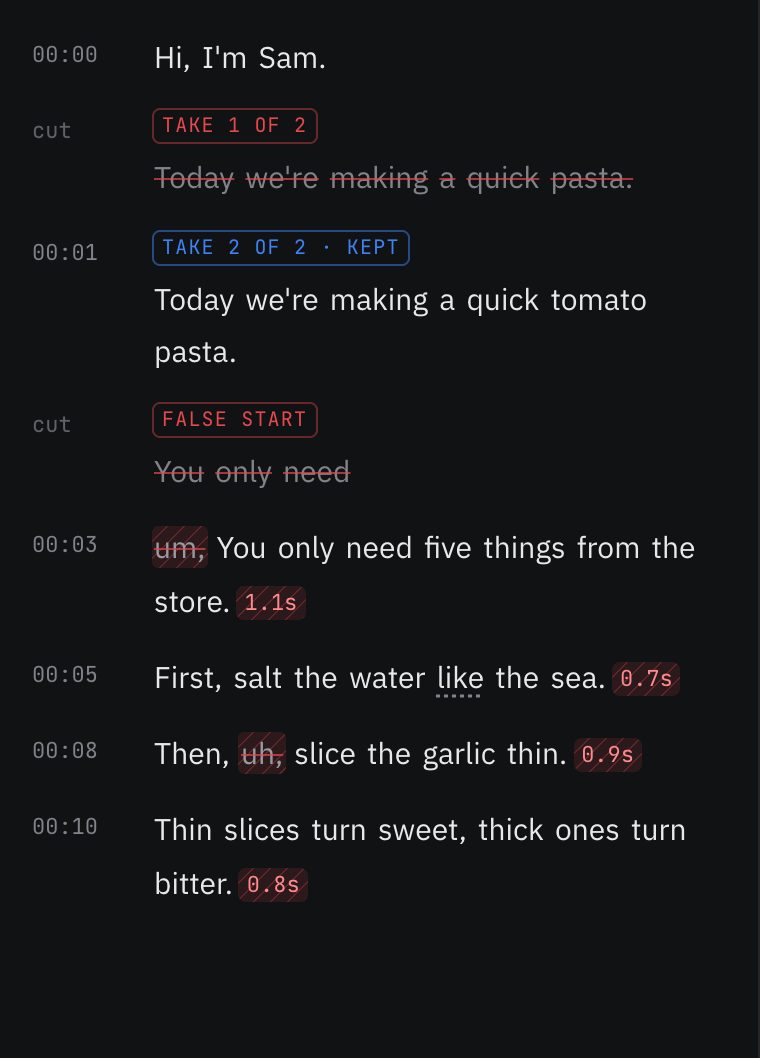
- Groups repeated sentences by fuzzy match and catches false starts: a short sentence followed by the same opening words within a few seconds.
- Scores each take and keeps the best one, with the reason written on the pick.
- Matches takes across separate files, in script order, if you stopped and restarted the camera.
- Cuts silence with three presets and walks each edge to the real start and end of the sound.
- Lets you fix a misheard word once and remembers the spelling in new edits.
What it won't do
- No XML export. You get a finished MP4 and an SRT, not a timeline for another editor.
- No screen recording.
- It needs a browser with WebCodecs, so older browsers won't run it.
- No desktop app, and the phone app isn't out yet.
- It doesn't open AVI files.
Moving over
Start with a recording you've already cut in TimeBolt, so you can compare the two edits line by line.
- 01Find the raw recording you'd normally load into TimeBolt.
- 02Open the editor in a supported browser. No account.
- 03Drop the file in. The speech model uses your graphics card if the browser offers WebGPU, and the processor if not.
- 04Choose a pacing preset. Natural keeps more air: gaps over 0.5 seconds become 0.2.
- 05Open Cuts, then Best takes, and listen to the takes for any line you're unsure about.
- 06Export the MP4 and the SRT.
Questions
Does it always keep the last take?
No. It keeps the take with the best score, and only falls back to the later take on a tie. The pick says when that happened.
Do I need credits to find retakes?
No. Retake and false-start detection are part of every edit, free ones included.
What does it score a take on?
Fillers, restarts, the longest pause inside the take, pace, word confidence, sound level and clipping, face framing and sharpness. The reason on the pick names what decided it.
Can I overrule the pick?
Yes. In Best takes, every take of a line has its own player and score. Press Use this take on the one you want.
Can I finish in Premiere afterward?
Not from a timeline export, since there's no XML. You can bring the finished MP4 and the SRT into any editor.
Does my video leave my computer?
No. Video and audio never upload.
Sources
- TimeBolt home page, read November 11, 2026
- TimeBolt blog: auto remove bad takes, read November 12, 2026
Keep reading
Try it on your own footage.
The editor opens in your browser with no account, and the sample project doesn't use an edit.