Cutroom AI vs Descript
Both let you edit video by editing the words. Descript is a full cloud editor with recording, Studio Sound, eye contact and an AI assistant. Cutroom AI is a narrower editor that runs in your browser and never uploads your video or audio.
Updated November 12, 2026
| Cutroom AI | Descript | |
|---|---|---|
| Where it runs | Your browser. Video and audio stay on your device | Cloud based |
| Edit by transcript | Yes. Removed words struck through, click to restore | Yes |
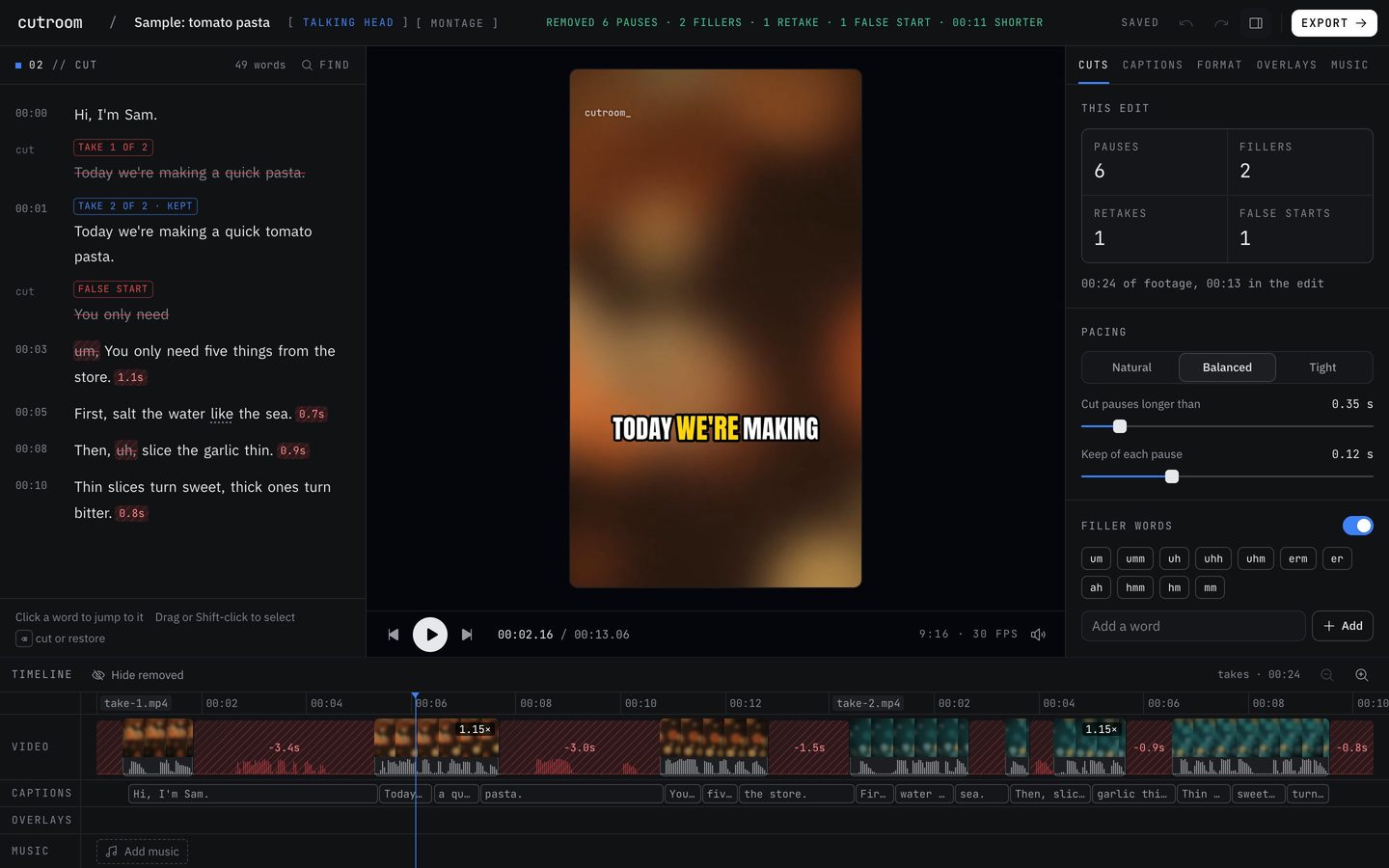
| Retakes | Repeated sentences grouped by fuzzy match. False starts caught | Remove Retakes |
| Which take stays | The best scored take, with its reason | "All but the final take" removed |
| Filler words | Hard fillers removed. Soft ones like "basically" only tagged | Filler removal |
| Clips from a long video | Clip finder on every plan | Create Clips, on paid plans (Hobbyist and up) |
| Multicam | Second camera matched by its words | Automatic Multicam |
| Audio cleanup | Noise removal. Loudness evened to -14 LUFS | Studio Sound |
| Eye contact, voice regenerate, translation | None | Yes |
| Screen and remote recording | Neither. A teleprompter recorder for your camera | Screen recording. Rooms for remote guests |
| AI assistant | Off | Underlord |
| Price | Free plan with 3 edits a month. Starter $9.99 and Pro $19.99 a month | Free plan at $0. Paid plans on its pricing page |
Facts about other products come from their own public pages, read on the dates under Sources. Products change; check their pages before you decide.
What each one is built for
Descript is a general editor built around the transcript. You can record your screen, bring in a remote guest through Rooms, fix audio with Studio Sound, correct eye contact, regenerate a word in your own voice, translate, and ask Underlord to make changes. There's a lot of tool there.
Cutroom AI is built for one kind of footage: you, talking to a camera, in one take or many. It cuts pauses, fillers and retakes on its own, picks the best take of each line, and finds clips in long recordings. Transcription and cutting happen on your computer, so the recording itself never uploads.
The real differences
Retakes. Descript's Remove Retakes keeps the final take. That's a sensible rule, since the last try is often the good one. Cutroom AI scores every take on fillers, restarts, the longest pause inside it, pace, word confidence, sound level, whether your face is in frame, and sharpness. It keeps the winner and says why, for example "No long pause mid-line". A tie goes to the later take, and the pick says so. Takes can sit in separate files too, since lines are matched across them in script order.
Fillers. Both remove ums. Cutroom AI only tags words like "like" and "you know", because they often carry meaning. Every removed word stays visible, struck through, so you can click it back.
Clips. Descript's Create Clips is on paid plans. Cutroom AI's clip finder is on every plan and reads recordings up to 180 minutes.
Studio tools. Descript has Studio Sound, eye contact correction, voice regeneration, translation, screen recording and remote recording. Cutroom AI has noise removal and loudness evened to -14 LUFS, and none of the rest. Its cloud text features, chat editing included, are switched off.
Multicam. Both sync a second camera. Cutroom AI matches angles by their words and switches at jump cuts and at sentence starts. It doesn't yet pick the camera of whoever is talking in a two-person interview.
Where Descript is the better pick
- You record screens, tutorials or remote guests.
- You need eye contact correction, a regenerated word in your voice, or translated captions.
- You want to tell an assistant what to change. Underlord does that, and Cutroom AI has no chat editing.
- A team edits together in one workspace.
- You want one editor for podcasts, screen tutorials and talking videos alike.
Where Cutroom AI is the better pick
- Footage that can't go to anyone's server: a patient talk, an internal all-hands, a recorded client call.
- A script filmed several times where the last take isn't always the best. You see each take's score and swap with Use this take.
- You want a finished cut with captions from one drop of a file.
- You want several versions in one pass: natural, tight, hook first, 30 seconds and 15 seconds.
- Clips from long recordings on the free plan.
How to try both
Film one short script three times, and fumble a line on purpose in the last take. Run it through Descript's Remove Retakes and through Cutroom AI, then check which take each kept for that line. Descript has a free plan. Cutroom AI opens without an account: open the editor and drop all three files in together.
Then try a ten minute talk with real ums in it and listen at the cut points. Cutroom AI walks each cut to where the sound really starts and ends, and the export check flags any word clipped at a cut.
Sources
- Descript home page, read November 11, 2026
- Descript pricing, read November 11, 2026
- Descript Remove Retakes page, read November 12, 2026
- Descript Create Clips page, read November 12, 2026
Keep reading
Try it on your own footage.
The editor opens in your browser with no account, and the sample project doesn't use an edit.