Cutroom AI vs reelscut
reelscut and Cutroom AI both find clips in long recordings without sending the video anywhere. reelscut is a desktop app in beta. Cutroom AI runs in the browser and also edits the full recording.
Updated November 12, 2026
| Cutroom AI | reelscut | |
|---|---|---|
| Runs as | A browser tab | Desktop app for Windows and macOS, v0.0.1 beta |
| Processing | On your device, on the graphics card or the processor | Local models and render |
| How clips are ranked | Hook, density, vocal energy and clean speech per sentence | "By potential engagement": speech energy, emotional peaks, motion, composition |
| Manual cuts | I and O keys, join ranges, nudge by a frame or a second | Mark start and end, extra intervals, 1 s and 5 s nudges, frame by frame |
| Language model | Off | Optional OpenAI key. It receives text only |
| Languages | 16 spoken languages | English and Portuguese |
| File formats | MP4, MOV, WebM, MKV and common audio. Not AVI | Any format FFmpeg reads |
| Caption tools | Word-timed captions, edit words, SRT export | Caption style and sync delay |
| Cleans the full recording | Pauses, fillers, retakes, best takes, versions | Not on its pages |
| Free use | 3 edits a month, with a watermark | 7-day trial, watermarked exports |
| Paid | Starter $9.99 and Pro $19.99 a month | Premium $5.99 a month, charged in Brazilian Real |
Facts about other products come from their own public pages, read on the dates under Sources. Products change; check their pages before you decide.
What each one is built for
reelscut is a clip finder you install. It transcribes on your own machine and ranks clips by potential engagement, using speech energy, emotional peaks in the audio, motion and composition. Each clip card shows a title, its time range and summary, with a render button. Its home page says "Release coming soon", and its releases page lists one release, v0.0.1 beta, from June 6, 2026.
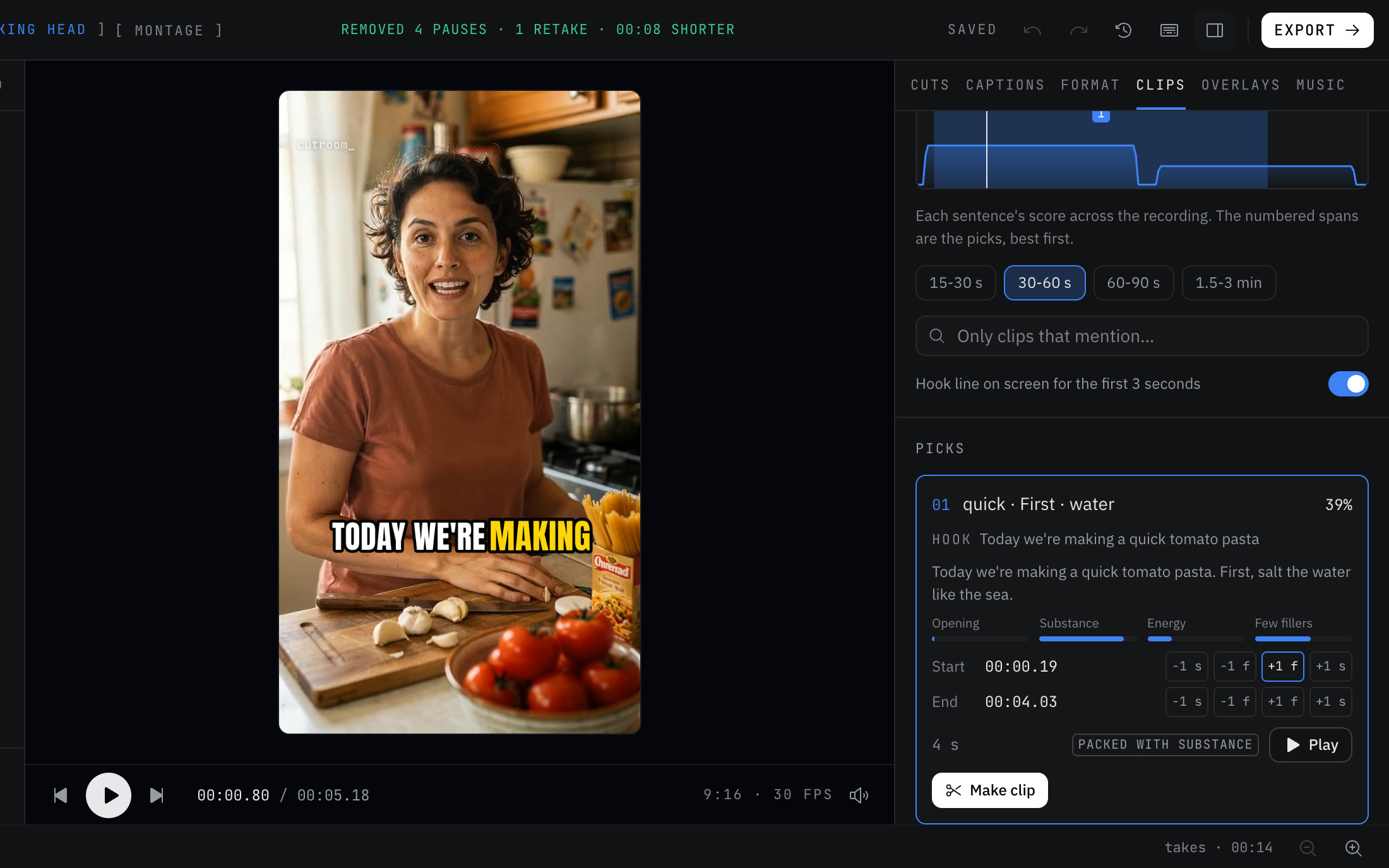
Cutroom AI's clip finder is one part of a browser editor. It scores sentences, draws an attention curve, and makes clips that keep their captions and follow your face. The same app cleans up the full recording and picks best takes.
Row by row
Where it runs. reelscut is a Windows or macOS download of about 500 MB. Cutroom AI is a tab in current Chrome, Edge, Arc or Safari 26. Both keep the video on your machine.
Scoring. reelscut adds visual signals, motion and composition. Cutroom AI's picks are led by speech and use no visual score, though a made clip still follows your face. Each Cutroom AI clip card shows its four scores, so you can see why it ranked.
Manual work. Both let you mark a start and end and add extra ranges. reelscut nudges by 1 or 5 seconds and steps frame by frame. Cutroom AI nudges by one frame or one second, and you mark ranges with the I and O keys while it plays.
Smarter picks. reelscut can send transcript text to your own OpenAI account. Cutroom AI's language model features are switched off, so its picks come from rules.
Languages and files. reelscut lists English and Portuguese and reads any format FFmpeg can. Cutroom AI transcribes 16 spoken languages and opens MP4, MOV, WebM, MKV and common audio, but not AVI.
Where reelscut is the better pick
- You'd rather install a desktop app than work in a browser.
- Your files are AVI or another format a browser can't decode.
- You want motion and composition counted in the ranking.
- You want to plug in your own OpenAI key for picks.
- You want unlimited exports at a flat price. Its Premium plan is $5.99 a month, charged in Brazilian Real.
- You want a mirror option or a caption sync offset.
Where Cutroom AI is the better pick
- You record in a language other than English or Portuguese, among the 16 Cutroom AI transcribes.
- You want a free plan rather than a 7-day trial.
- You need the full recording cleaned up too, with best takes and several versions.
- You can't install software on the computer you use.
- You want a hook line on each clip, and Make all then Export all.
How to try both
Use one 45 minute recording you know well and write down five moments you'd clip. reelscut's trial runs 7 days with every feature and watermarked exports. Cutroom AI opens without a sign-up. See which of your five moments each tool ranks near the top, and time how long a two-part clip takes to mark by hand in each.
Sources
- reelscut home page and app screenshots, read November 12, 2026
- reelscut pricing and FAQ, read November 12, 2026
- reelscut releases, read November 12, 2026
Keep reading
Try it on your own footage.
The editor opens in your browser with no account, and the sample project doesn't use an edit.